
CQLinq Features
|
With the open-source NDepend MCP Server, you can generate CQLinq code queries and rules from natural language requests.
Based on your request, the AI assistant invokes the MCP tool
The The generated query or rule can be executed directly through the MCP Server or copy/pasted into the NDepend query editor. In addition, the prompts associated with each CQLinq feature also serve as valuable human-readable documentation. In this video, at 18:33, we show how to generate a full non-trivial code rule. 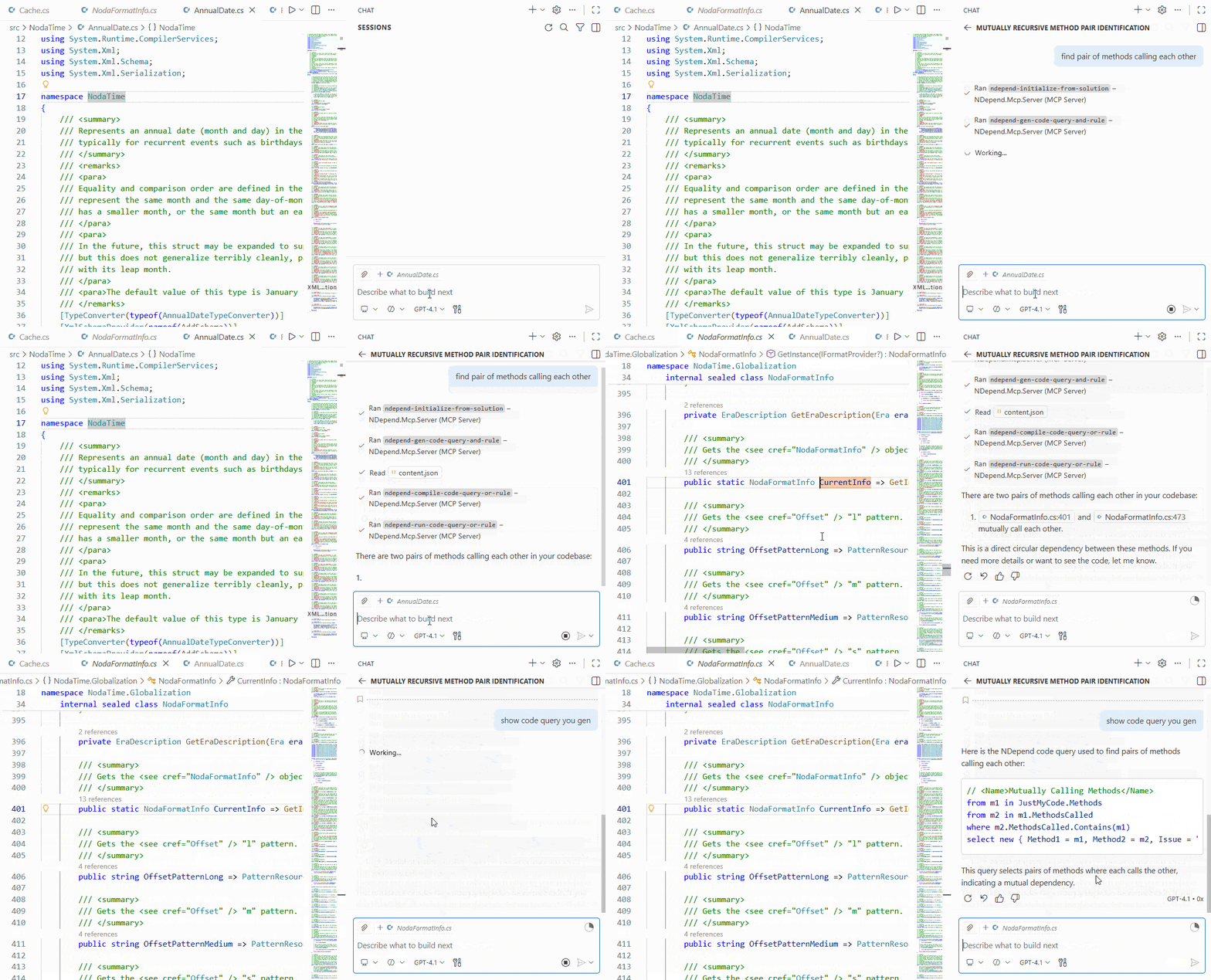
|
Once you've analyzed your first .NET code base with NDepend, you'll see that the NDepend project created contains around 200 default CQLinq queries and rules, categorized in different groups.
This set of default queries and rules cover the various CQLinq features in terms of code querying.
This document is a quick list of these features and informs the reader about what is possible with CQLinq. Keep in mind that these features are available through the well-defined list of types supported by the CQLinq querying model.
- Querying Debt, Issues, Rules and Quality Gates
- Querying the Code Object Model
- Querying the Code Dependencies and Design
- Querying Attributes
- Querying the Code Quality and Code Metrics
- Querying the Code Diff
- Querying the Naming of Code Elements
- Querying the States Mutability
- Querying Source Files Paths
Querying Debt, Issues, Rules and Quality Gates
Introduction
From the introduction of NDepend v2017.1 CQLinq is not just about code querying but also about querying Debt, Issues, Rules and Quality Gates.
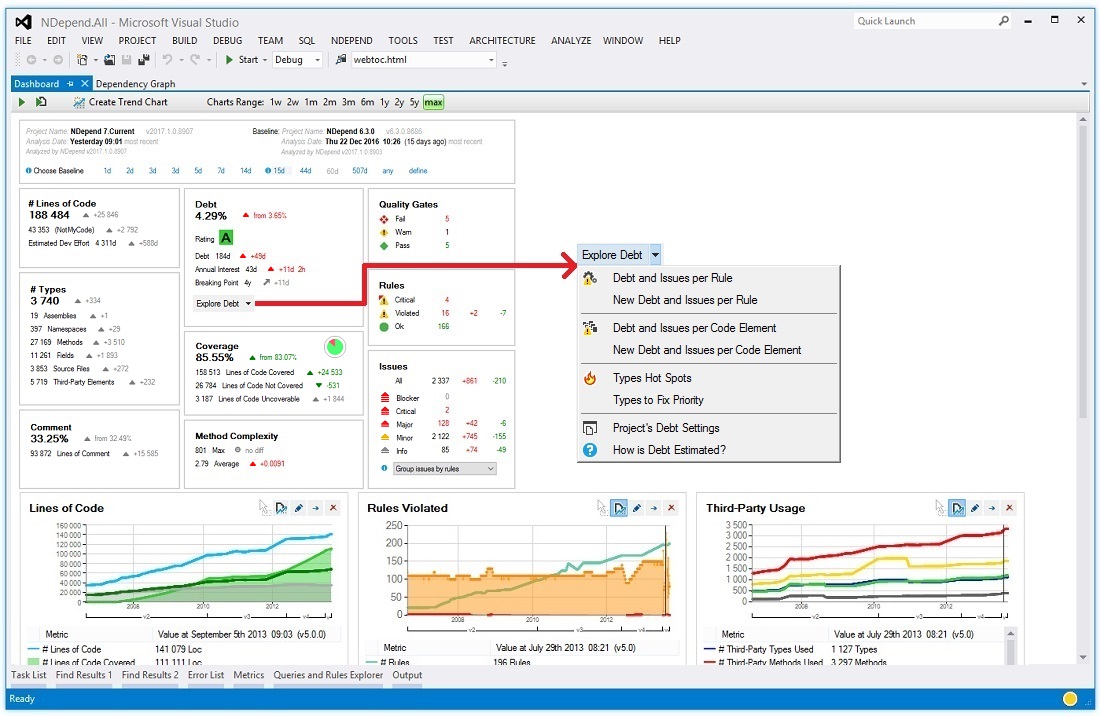
This feature is useful for in-depth exploration of the technical-debt. Here we demonstrate how a few clicks from the Dashboard can generate queries to explore the debt and the issues.
This feature is also useful to define :
- Trend Metrics based on Debt, Issues, Rules and Quality Gates numbers.
- Quality Gates based on Debt, Issues and Rules numbers.
For example a Quality Gate that would define thresholds concerning the percentage of technical-debt could look like:
// <QualityGate Name="Percentage Debt" Unit="%" />
failif value > 30%
warnif value > 20%
let timeToDev = codeBase.EffortToDevelop()
let debt = Issues.Sum(i => i.Debt)
select 100d * debt.ToManDay() / timeToDev.ToManDay()
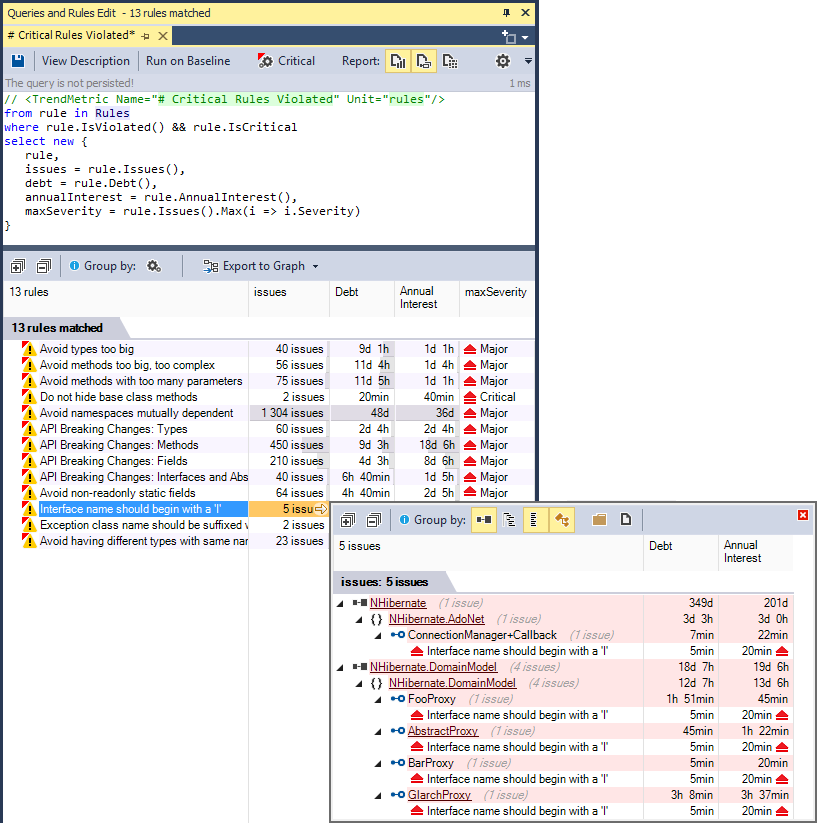
A Trend Metric that would count the number of critical rules violated could look like:
// <TrendMetric Name="# Critical Rules Violated" Unit="rules"/>
from rule in Rules
where rule.IsViolated() && rule.IsCritical
select new {
   rule,
   issues = rule.Issues(),
   debt = rule.Debt(),
   annualInterest = rule.AnnualInterest(),
   maxSeverity = rule.Issues().Max(i => i.Severity)
}
Not only this Trend Metric is useful to follow the trend, but its result can also be browsed for in-depth exploration:
Querying diff since the Baseline
When a baseline is available, rules are passed against the baseline in addition to being passed against the actual code base snapshot. As a result NDepend can compare both issues sets: the issues set obtained by passing rules on the baseline and the issues set obtained by passing rules on the actual code base snapshot.
CQLinq can then be used to query the Debt, Issues, Rules and Quality Gates diff. For example a Trend Metric that counts the new issues since baseline could look like:
// <TrendMetric Name="# New Issues since Baseline" Unit="issues"/>
from issue in Issues
where issue.WasAdded()
select new { issue, issue.Debt, issue.AnnualInterest, issue.Severity }
A Quality Gate that would forbid more than 2 man-days of technical debt since the baseline could look like:
// <QualityGate Name="New Debt since Baseline" Unit="man-days" />
failif value > 2 man-days
warnif value > 0 man-days
let debt = Issues.Sum(i => i.Debt)
let debtInBaseline = IssuesInBaseline.Sum(i => i.Debt)
select (debt - debtInBaseline).ToManDay()
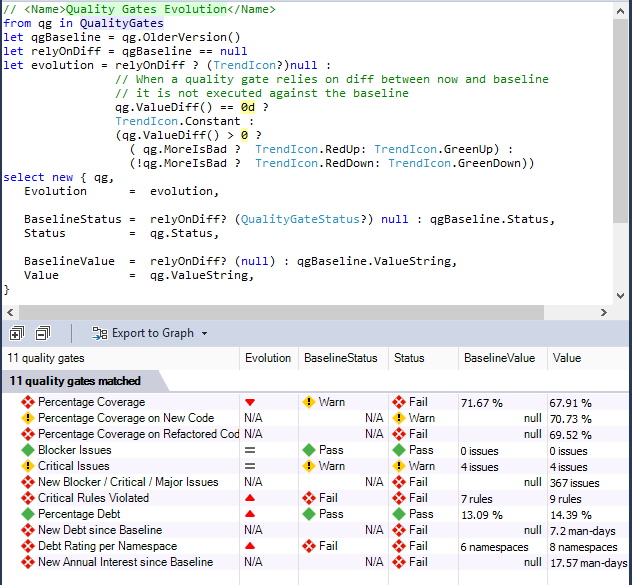
A dozen of Quality Gates are defined by default, and it is easy to customize them and to create new ones. In the screenshot below, this query (generated by a single click on the Dashboard) shows not only the Quality Gates actual status, but also the Quality Gates status on baseline. Quality Gates that rely on diff cannot be passed against the baseline and this is why they have a Not Available N/A value.
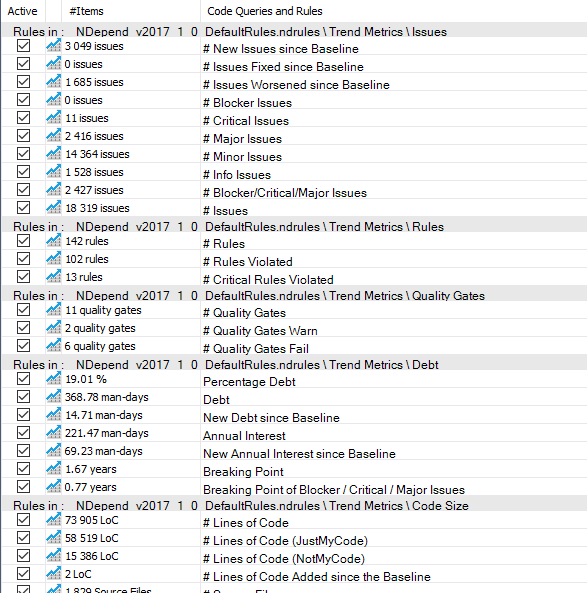
In the same way, many Trend Metrics related to Debt, Issues, Rules and Quality Gates are defined by default and it is easy to customize them and create new ones.
The dashboard proposes several menus to generate queries to explore the Debt, Issues, Rules and Quality Gates status Any number can be clicked to generate a query that lists the counted items.
How it works
Specialized types are defined by the NDepend.API to specify the debt model, including Debt ; IIssue ; IRule ; IQualityGate ; QualityGateStatus.
However the two key types are: IIssuesSet ; IIssuesSetDiff.
- First NDepend runs the activated rules both on the actual snapshot and on the baseline.
- It computes issues, debt numbers and diff.
- Then it populates these issues-set and issues-set-diff objects.
- Queries that rely on issues-set and issues-set-diff are executed only once these sets are filled. As a consequence a Rule cannot rely on these sets, but a Quality Gate can.
Instead of writing a query like...
from i in context.IssuesSet.AllIssues select i
...or like...
from i in context.IssuesSetDiff.OlderIssuesSet.AllIssues select i
...4 domains are proposed by CQLinq: Issues, IssuesOnBaseline, Rules and QualityGates.
These domains are shortcuts for context.IssuesSet.AllIssues, context.IssuesSetDiff.OlderIssuesSet.AllIssues, context.IssuesSet.AllRules and context.IssuesSet.AllQualityGates.
These domains can be seen as range variables of type: IEnumerable<IIssue> ; IEnumerable<IRule> ; IEnumerable<IQualityGate>.
With these domains, simple queries can then be written like...
from i in Issues select i
...or even just:
Issues
The same way instead of constantly referring to issues-set and issues-set-diff to obtain data like for example...
from codeElement in CodeElements
where context.IssuesSet.HasIssue(codeElement)
select new {
   codeElement,
   issues= context.IssuesSet.Issues(codeElement),
   newIssues = context.IssuesSet.Issues(codeElement)
               .Where(i => context.IssuesSetDiff.WasAdded(i))
}
...the types ExtensionMethodsCQLinqIssuesSet and ExtensionMethodsCQLinqIssuesSetDiff propose convenient extension methods which are automatically translated by the CQLinq compiler to calls on the issues-set and the issues-set-diff objects.
from codeElement in CodeElements
where codeElement.HasIssue()
select new {
   codeElement,
   issues= codeElement.Issues(),
   newIssues = codeElement.Issues()
               .Where(i => i.WasAdded())
}
Debt value can be formatted to convenient values through extension methods proposed by the type ExtensionMethodsCQLinqDebtFormatter which are translated to calls to members of a IDebtFormatter object, by the CQLinq compiler.
This facility offers a convenient way for harnessing Debt-formatting project value defined in the NDepend Project Settings.
Instead of writing...
from i in Issues
select new { i, manDays = context.DebtFormatter.ToManDay(i.Debt) }
...we can write:
from i in Issues
select new { i, manDays = i.Debt.ToManDay() }
Finally please note that when modifying a code rule, the issues-set and issues-set-diff are automatically recomputed in a few seconds and all numbers on the Dashboard are refreshed. In the same way, after an NDepend analysis (typically triggered by a Rebuild All in Visual Studio) these sets are automatically recomputed in a few seconds.
Querying the Code Object Model
The Code Elements Hierarchy
For NDepend, a .NET code base ICodeBase object is made of
IAssembly,
INamespace,
IType,
IMethod and
IField objects.
This object model reflects the hierarchical organization of the code where the code base is made of assemblies that contain namespaces that contain types that contain methods and fields.
Notice that if a same namespace is spawned across N assemblies, the hierarchy is preserved and there are N
INamespace objects, one contained in each assembly.
To navigate across this hierarchy, several parent and child properties are proposed like IMember.ParentType or IType.Methods. Most of the time, instead of using these properties it is more convenient to use the extension methods declared in the class ExtensionMethodsProjection that project a sequence of parent to a sequence of child and vice-versa. For example, see the usage of the extension method ChildMethods() in the query:
from m in Application.Namespaces.WithNameLike("ProductName.FeatureA").ChildMethods()
where m.CyclomaticComplexity > 10 select m
The Predefined Domains
To access these various kind of code elements, CQLinq proposed different predefined domains
Assemblies, Namespaces, Types, Methods, Fields, codeBase, Application, ThirdParty and
JustMyCode.
Before continuing, it is important to click the link above and understand these predefined domains and how they relate to the application, third-party and just-my-code views of the code base.
Interfaces
Several ways are proposed to access the interfaces implementations, they are summarized in this query:
// Accessing the property IType.IsInterface
let interfaces = ThirdParty.Types.Where(t => t.IsInterface)

// Accessing the extension method ExtensionMethodsSequenceUsage.ThatImplementAny()
from t in JustMyCode.Types.ThatImplementAny(interfaces)

// Accessing the extension methods ExtensionMethodsCQLinqDependency.Implement()
where t.Implement("System.IDisposable")
select new {
  t,
  // Accessing the property IType.InterfacesImplemented (there is also IType.TypesThatImplementMe)
  thirdPartyInterfaces = t.InterfacesImplemented.Intersect(interfaces ) }
Base and Derived Classes Hierarchy
The same way there are several ways to navigate across the base and derived classes hierarchy:
// Accessing the extension method ExtensionMethodsSequenceUsage.ThatDeriveFromAny()
from t in JustMyCode.Types.ThatDeriveFromAny(ThirdParty.Types)

// Accessing the extension methods ExtensionMethodsCQLinqDependency.DeriveFrom()
where !t.DeriveFrom("System.MulticastDelegate")
select new {
 t,
 // Various properties of IType
 t.BaseClass,
 t.BaseClasses,
 t.DerivedTypes, // Include direct and indirect derived types
 t.DirectDerivedTypes }
Methods abstract, virtual and override
The API proposes also facilities to navigate across methods overridden, and overrides:
from m in Application.Methods
where !m.IsAbstract && m.IsVirtual
select new {
  m,
  // Enumerates methods overridden by m
  m.OverriddensBase,
  // Enumerates methods that overrides m directly
  m.OverridesDirectDerived,
  // Enumerates methods that overrides m directly or indirectly
  m.OverridesDerived }
Call chain with abstract methods
Sometime you might want to resolve concrete methods that override an abstract method called. This is possible by using the NDepend API method FillIterative() this way:
let callers =
Application.Methods.WithFullName("ClassCaller.MethodCaller()")
.FillIterative(
  methods => methods.SelectMany(
    m1 => m1.MethodsCalled.Concat(
          m1.OverridesDerived)))

from caller in callers
select new { caller.CodeElement, caller.Value }
Here is the code sample on which this query is executed:
class ClassCaller {
   IInterface1 m_Obj;
   void MethodCaller() {
      m_Obj.Method1();
   }
}
interface IInterface1 { void Method1(); }
class Class1 : IInterface1 {
   IInterface2 m_Obj;
   public void Method1() {
      m_Obj.Method2();
   }
}
interface IInterface2 { void Method2(); }
class Class2 : IInterface2 {
   public void Method2() {
      ClassCalled.MethodCalled();
   }
}
class ClassCalled {
   internal static void MethodCalled() { }
}
Here is the query result:

Let's export this query result to the dependency graph. Here overrides of abstract methods are not seen as called but all potentially called methods at runtime are shown.

Encapsulation and Visibility
Several facilities are proposed to deal with the visibility of a IMember object. Notice in the default query below the attributes that are related to visibility, and the possibility to obtain the optimal visibility. The optimal visibility is the most restricted visibility that a member can have in the context of the parent code base, without provoking a compilation syntax error. For example an internal method called only by methods defined in the same class could be declared as private.
// <Name>Methods that could have a lower visibility</Name>
warnif count > 0 from m in JustMyCode.Methods where
  m.Visibility != m.OptimalVisibility &&
  !m.HasAttribute("NDepend.Attributes.CannotDecreaseVisibilityAttribute".AllowNoMatch()) &&
  !m.HasAttribute("NDepend.Attributes.IsNotDeadCodeAttribute".AllowNoMatch()) &&
  // If you don't want to link NDepend.API.dll you can use your own attributes and adapt this rule.

  // Eliminate default constructor from the result.
  // Whatever the visibility of the declaring class,
  // default constructors are public and introduce noise
  // in the current rule.
  !( m.IsConstructor && m.IsPublic && m.NbParameters == 0) &&

  // Don't decrease the visibility of Main() methods.
  !m.IsEntryPoint

select new { m,
             m.Visibility ,
             CouldBeDeclared = m.OptimalVisibility,
             m.MethodsCallingMe }
Querying the Code Dependencies and Design
In the previous section, we have seen how to query different usages like interface implementation, class derivation, methods override and attributes tagging.
The NDepend code model proposes a general dependency model through the interfaces
IUsed
and IUser.
With this two interfaces it is easy to browse dependency across any kind of code elements.
The dependency model is general in the sense that it doesn't rely on the kind of usage (interface implementation, field assignment, method call...).
A and B being two code elements, we say that A depends on B if, when B is not available, A cannot be compiled.
Instead, of using methods of the IUsed and IUser interfaces, you'll often find more convenient to call extension methods from the class ExtensionMethodsCQLinqDependency where user and used code elements are named, like in the following query:
from m in Methods where
m.IsUsing("System.IDisposable") &&
m.IsUsedBy("MyAssemblyName".AllowNoMatch())
select m
Querying the Code Architecture
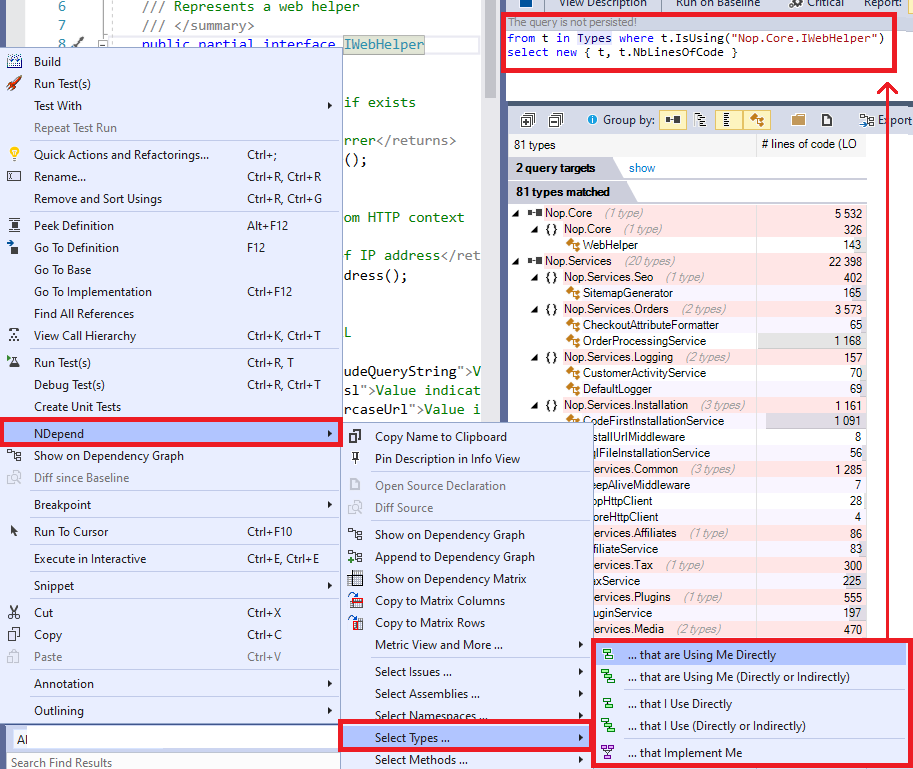
All sorts of dependency query can be generated with the NDepend right click menus available on code element right click in:
- The Visual Studio Code Editor: The NDepend menu is available on Namespace, Types, Methods, Fields declaration right click (see the screenshot below)
- The Visual Studio Solution Explorer: The NDepend menu is available on File, Directory (that represent a namespace), Project, Project Dependencies and Files child elements right click
- The NDepend menu is available on any code element right click presented in any NDepend panels
With the NDepend right click dependency menus you can query various dependencies levels like:
- types using a project
- or methods used by a namespace
A section below details the indirect dependencies querying capabilities (like methods using methods ... using methods using X()).
Generating Rules about the Code Architecture
Notice how such extension methods are used by rules generated from dependency graph or dependency matrix, to forbid some particular dependency:
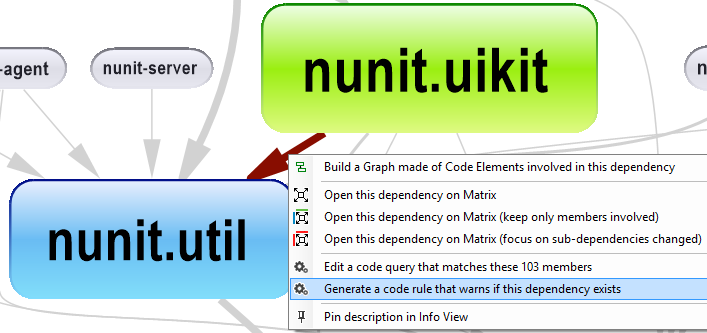
The rule generated is shown below. It could be easily adapted to forbid or enforce any dependency in a code base.
warnif count > 0 from a in Assemblies where
a.IsUsing ("nunit.util") &&
(a.Name == @"nunit.uikit")
select new { a, a.NbLinesOfCode }
// the assembly nunit.uikit
// shouldn't use directly
// the assembly nunit.util
// because (TODO insert your reason)
The extension methods of the class ExtensionMethodsSequenceUsage represent also a convenient way to query dependencies of a code base (and often a faster way as well):
from t in Types.UsedByAny(Types.Where(t => t.IsStatic)) select t
Each code element interfaces presents properties to get a sequence of user or used code elements (of the same kind). Here is a query relying on IMethod.MethodsCalled for example. Notes that in general, this facility is slower than the ones presented above.
let setters = Methods.Where(m => m.IsPropertySetter).ToHashSet()
from m in Methods
let settersCalled = m.MethodsCalled.Intersect(setters)
where settersCalled.Count() > 0
select new { m, settersCalled }
Browsing all Classes dependencies
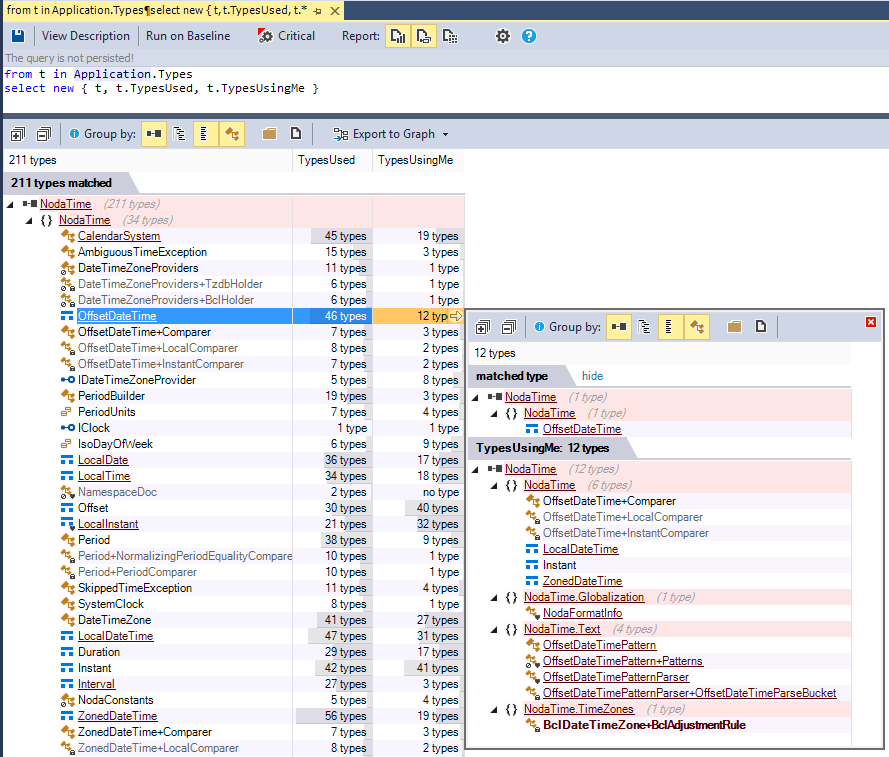
To browse all classes dependencies just write this code query. Of course you can refine this query for any special need.
from t in Application.Types
select new { t, t.TypesUsed, t.TypesUsingMe }
Indirect Usage and Transitive Closure
The class ExtensionMethodsCQLinqDependency presents some extension methods containing the word Indirect in their names, like for example, the extension method IsIndirectlyUsing(). These extension methods deal with indirect usage.
In other words indirect usage means transitive closure. You can get not only callers (or callees) but also callers of callers recursively (or callees of callees recursively).
For example if A is using B that is using C, A is not directly using C but A is indirectly using C (with a depth of 2). Here is a query that enumerates methods that are directly or indirectly calling the interface method System.IDisposable.Dispose().
from m in Methods
let depth0 = m.IsIndirectlyUsing("System.IDisposable.Dispose()")
select m
The extension method DepthOfIsUsing goes further since it returns the depth of usage.
from m in Methods
let depth0 = m.DepthOfIsUsing("System.IDisposable.Dispose()")
where depth0  >= 0 orderby depth0 ascending
select new { m, depth0 }
The depth returned is a Nullable<ushort> value.
- It is null if m doesn't call indirectly the target method.
- It is 1 if m calls directly the target method.
- It is greater than 1 if m calls indirectly the target method.
This indirect usage possibility is especially useful to generate Call Graphs or Class Inheritance Graphs.
Such indirect dependency query can be generated by:
- by right clicking a code element in an NDepend panel
- by right clicking a code elemnt declaration in the Visual Studio code editor
- by right clicking an item (file, folder project...) in the Visual Studio solution explorer
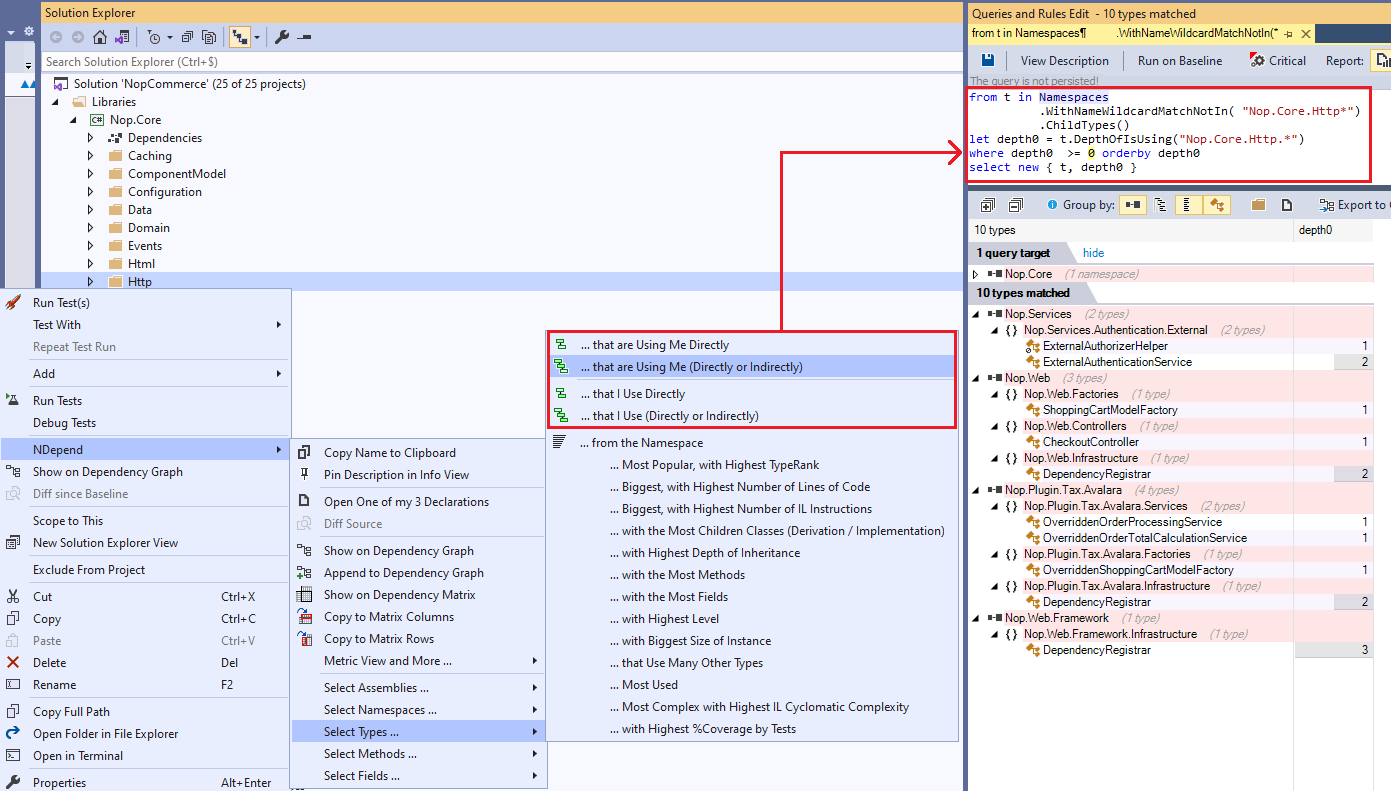
On the screenshot above notice the button Export to that can export the query result to the dependency graph (see below) or to an HTML, Excel, XML or text document.
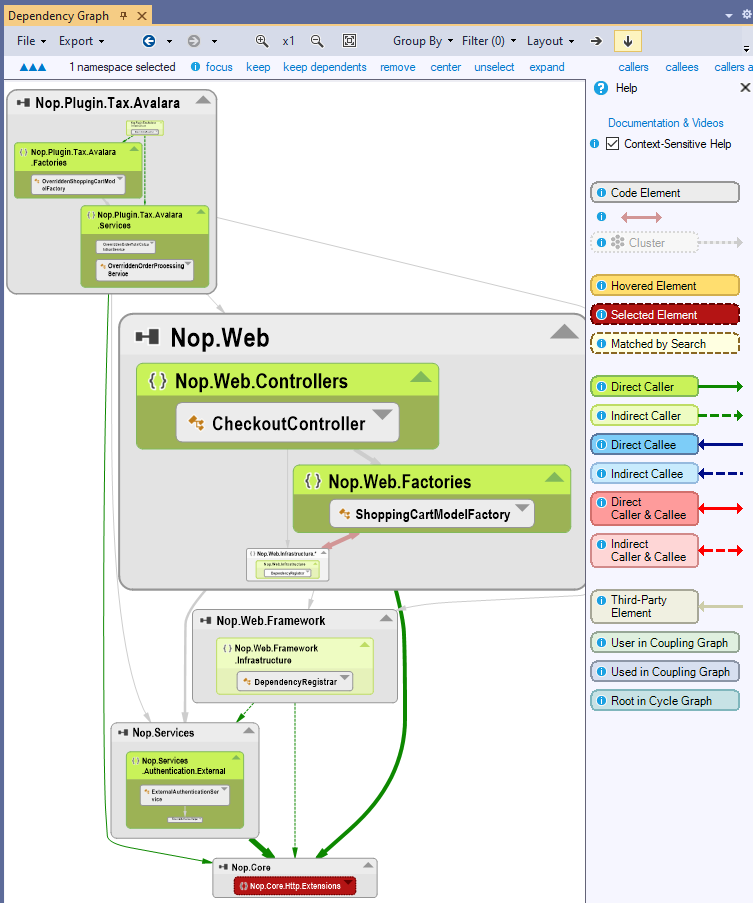
Some of the extension methods of the class ExtensionMethodsSequenceUsage also contain the word Indirect or the word Depth to work with indirect usage from a sequence to a code element or even any code elements of a target sequence (suffix Any).
Such extension method named DepthOf... returns a ICodeMetric<TCodeElement,TNumeric> object. This code metric object represents the code metric that assigns the indirect usage depth (as defined above), to any code element of the input sequence. Code elements that are not in the ICodeMetric<,>.DefinitionDomain have a null depth.
For example, the following query matches all methods that are calling, directly or indirectly the setter of a property, with the depth of call:
let setters = Methods.Where(m => m.IsPropertySetter).ToHashSet()
let depthMetric = Application.Methods.DepthOfIsUsingAny(setters)
from m in depthMetric.DefinitionDomain
let depthValue = depthMetric[m]
orderby depthValue ascending
select new { m, depthValue }
Indirect Usage and Transitive Closure with FillIterative()
Special CQLinq methods like IsIndirectlyUsing() and DepthOfIsUsing() cannot take a ICodeElement as argument.
However to obtain the transitive closure of any code element the method FillIterative() can be used this way:
from t in Application.Types
let callers = t.TypesUsingMe
let callersIndirect = t.TypesUsingMe
   .FillIterative(ts =>
       ts.SelectMany(t1 => t1.TypesUsingMe))
   .DefinitionDomain
select new { t, callers, callersIndirect  }

The method FillIterative() returns a ICodeMetric<TCodeElement,ushort> object, like the method DepthOfIsUsing() shown in the previous section. You can refer to the previous section for explanation on ICodeMetric.
The method FillIterative() iteratively fills a sequence of code elements, until no new element can be added. The first iteration starts with initialSeq, and the function func is used to compute new elements of the iteration N+1 from new elements computed at iteration N. The method FillIterative() is well suited to obtain a transitive closure in terms of call but it is generic enough to be used for others purposes.
[Extension()]
public static ICodeMetric<TCodeElement,ushort> FillIterative<TCodeElement>(
IEnumerable<TCodeElement> initialSeq,
Func<IEnumerable<TCodeElement>,IEnumerable<TCodeElement>> func
)
where TCodeElement: class, ICodeElement
Indirect Usage, Transitive Closure of Virtual and Override Methods with FillIterative()
Sometime the query generated by right clicking a method through the menu Select Methods (...) that are Using Me (Directly or Indirectly) doesn't return all expected methods. This is generally because the right-clicked method, or some of its callers methods, are overrides of a virtual method. Only the virtual method is seen as called in the code base and thus, the transitive closure of calls is stopped prematurely because the overrides are not seen as called. It is possible to counter this phenomenon with the FillIterative() API method and a bit of astute.
For example such query is generated when right clicking a method that overrides a virtual method:
from m in Methods
let depth0 = m.DepthOfIsUsing(
 "OrchardCore.Modules.ModuleEmbeddedFileProvider.GetDirectoryContents(String)")
where depth0  >= 0 orderby depth0
select new { m, depth0 }
It can be transformed into this query to obtain also callers of virtual methods overriden, obtained thanks to the property IMethod.OverriddensBase:
from m1 in Methods.WithFullName(
 "OrchardCore.Modules.ModuleEmbeddedFileProvider.GetDirectoryContents(String)")
let depth0 = m1.MethodsCallingMe.Concat(m1.OverriddensBase)
   .FillIterative(methods =>
      methods.SelectMany(x => x.MethodsCallingMe.Concat(x.OverriddensBase)))

from m2 in depth0.DefinitionDomain
select new { m2, depth0= depth0.ValueOf(m2) }
The same pattern can be used for classes that implement some base classes, and/or implement some interfaces. The query generated when right clicking such type looks like:
from t in Types
let depth0 = t.DepthOfIsUsing(
   "OrchardCore.ContentFields.Drivers.HtmlFieldDisplayDriver")
where depth0  >= 0 orderby depth0
select new { t, depth0 }
That can be transformed into:
from m1 in Types.WithFullName(
   "OrchardCore.ContentFields.Drivers.HtmlFieldDisplayDriver")
let depth0 =
   m1.TypesUsingMe.Concat(m1.BaseClasses).Concat(m1.InterfacesImplemented)
   .FillIterative(methods =>
      methods.SelectMany(x =>
         x.TypesUsingMe.Concat(x.BaseClasses).Concat(x.InterfacesImplemented)))

from m2 in depth0.DefinitionDomain
select new { m2, depth0= depth0.ValueOf(m2) }
Querying Attributes
Searching for Attribute Classes
You can locate all attribute types using the following query:
Types.Where(t => t.IsAttributeClass)
You can also search for attribute classes from the search panel as shown below:

Listing all Attributes Tags
The following query can list all attribute usages in the analyzed code base:
// <Name>All attributes usage</Name>Here is a screenshot of the query result:
let attributeTypes = codeBase.Types.Where(t => t.IsAttributeClass)
from t in attributeTypes
from at in t.TagsWithMeAsAttribute
select new {
at.CodeElementTagged,
at.AttributeType,
parameters = at.Parameters
.Select(p =>p.Name +": "+p.Value.ToString()).Aggregate(", ")
}
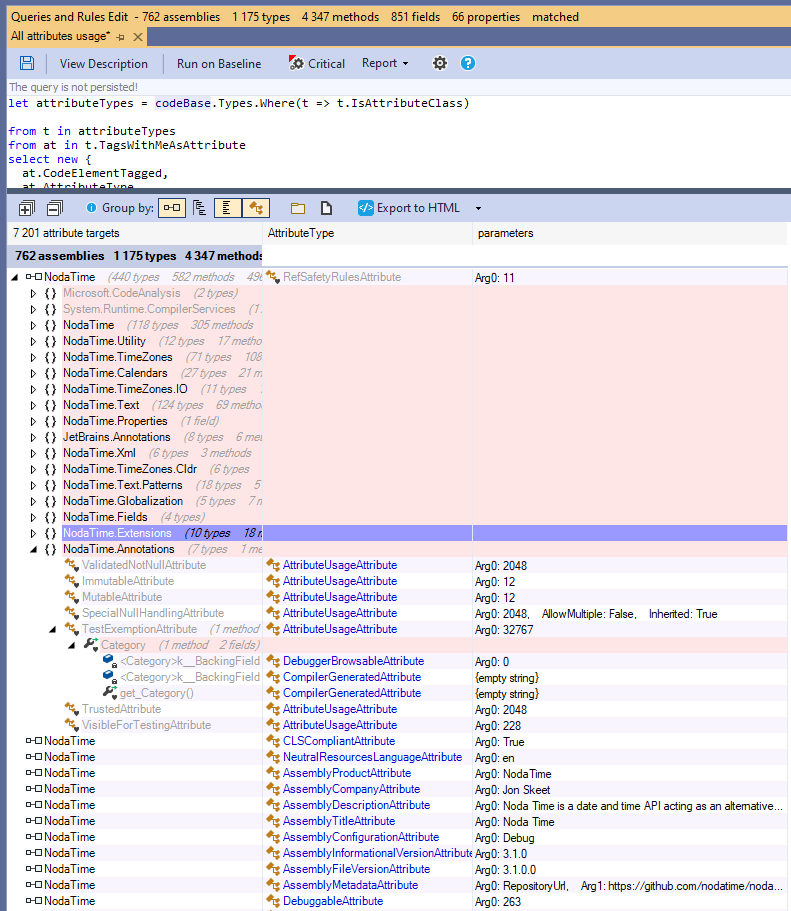
Listing and Counting Tags of an Attribute Class
Right-clicking an attribute class opens a menu that allows you to generate a code query:
Select Assemblies/Types/Methods/Fields that are tagged with this attribute.
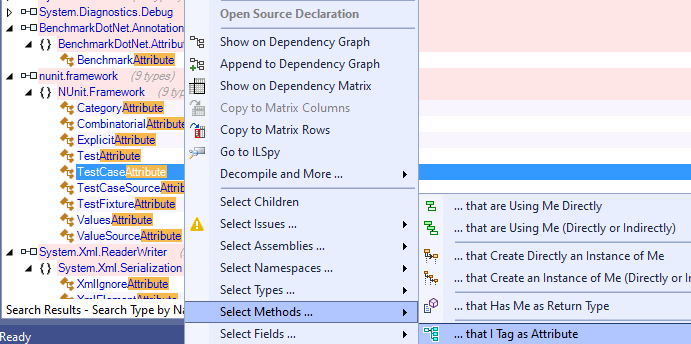
The generated query is human-readable and appears as follows:
// <Name>NUnit.Framework.TestCaseAttribute usage</Name>
let attributes = ThirdParty.Types.WithFullName(
  "NUnit.Framework.TestCaseAttribute")
where attributes.Any()

let tags = attributes.SelectMany(sa => sa.TagsWithMeAsAttribute)
from tag in tags
where tag.CodeElementTagged.IsMethod // Change or comment
select new {
  tag.CodeElementTagged,
  nb_params = tag.Parameters.Count,
  @params = tag.Parameters
    .Select(p =>p.Name +": "+p.Value.ToString())
    .Aggregate("    "),
  tag.AttributeType
}
If a code element is tagged multiple times with the same attribute, the generated query will match the element multiple times—once per tag.
To count the number of tags of a particular attribute, use the following query:
// <Name>System.Diagnostics.DebuggerDisplayAttribute number of usage</Name>
let attributes = ThirdParty.Types.
   WithFullName("System.Diagnostics.DebuggerDisplayAttribute")

let tags = attributes.SelectMany(sa => sa.TagsWithMeAsAttribute)

let taggeds = tags.ToLookup(t => t.CodeElementTagged)

from tagged in taggeds
select new {
   tagged.Key ,
   nbTags = tagged.Count()
}
Extracting Values Used in Attribute Tags: Both Constructor Arguments, and Optional Parameters
In the generated query above, each attribute tag displays its list of constructor arguments and optional parameters. This expression can generate a string containing all parameters name and value:
tag.Parameters.Select(p =>p.Name +": "+p.Value.AsString).Aggregate(", ")
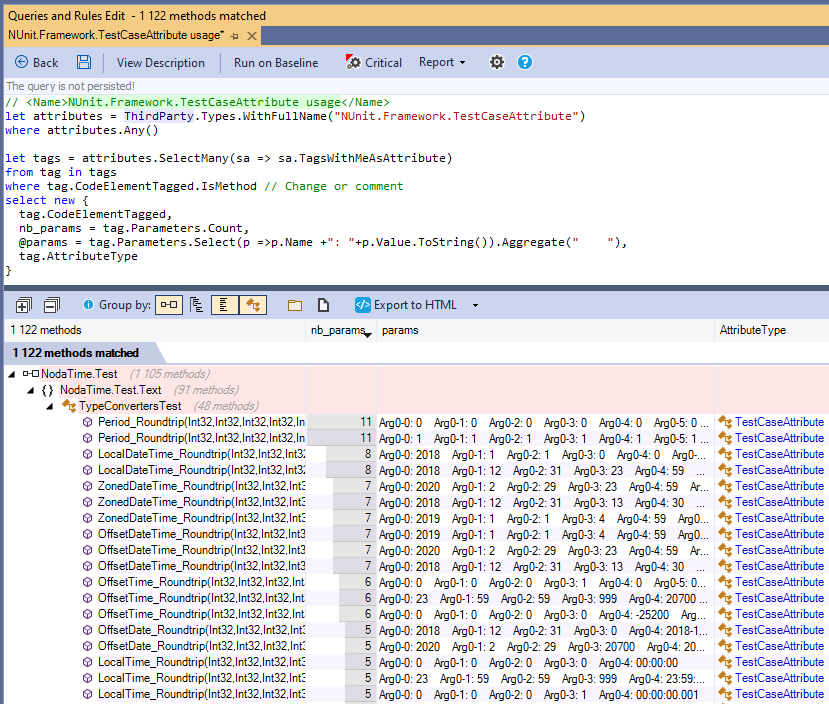
Constructor arguments are labeled "Arg0", "Arg1", etc., while optional parameter names are displayed explicitly.
If an argument or a parameter is an array, each element is labeled with a second index, e.g., "Arg0-0", "Arg1-1", etc.
This typically occurs with attribute constructors such as TestCaseAttribute(params object[] parameters).
Querying and Creating Rules Based on Attribute Values
Creating code rules and queries based on attribute properties is now straightforward.
For example, the following rule inspects the template string passed as the first parameter of a RouteAttribute:
// <Name>RouteAttribute template enforcement</Name>
warnif count > 0  // This query is a rule with this prefix

let attributes = ThirdParty.Types.WithName("RouteAttribute")
where attributes.Any()

let tags = attributes.SelectMany(sa => sa.TagsWithMeAsAttribute)
from tag in tags

// ctor  RouteAttribute(string template)   Arg0 refers to the first argument
let arg0 = tag.ValueOf("Arg0")  where arg0 != null
let template = arg0.AsString
let violation =

// should starts with api with no leading slash
// KO: [Route("/api/products/")]     OK: [Route("api/products")]
!template.StartsWith("api/") ?
  @"should starts with ""api/"" with no leading slash" :

// Kebab-case enforcement: should not contain any upper character
// KO: [Route("api/GetProducts")]    OK: [Route("api/get-products")]
template.ToCharArray().Any(c => char.IsUpper(c)) ?
  "should not contain any upper character" :

// Avoid reserved characters in route templates
// KO: [Route("api/data&value")]
template.ToCharArray().Any(c => "&=#?".Contains(c)) ?
  "should not contain reserver characters like '&=#?'" : null

where !violation.IsNullOrEmpty()

select new {
  tag.CodeElementTagged,
  template,
  violation,
  Debt = 5.ToMinutes().ToDebt()
}

//<Expl>
// The *{0}* is tagged with RouteAttribute("{1}") but the template {2}.
// </Expl>
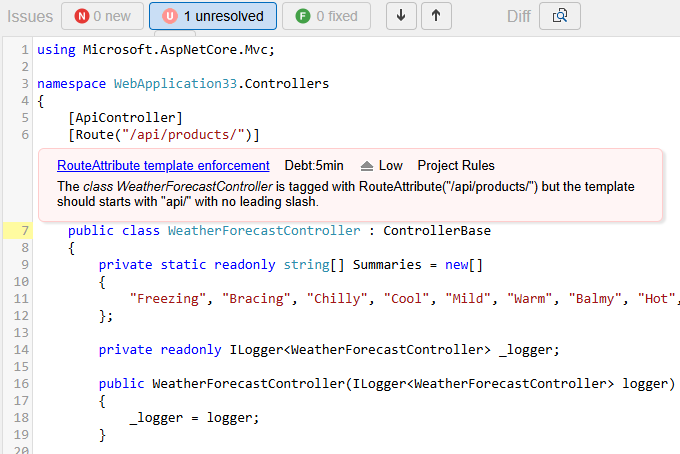
Here is an issue obtained with this rule, seen in the NDepend report:
Attribute API
The interface IAttributeTarget, implemented by IAssembly, IType, IMethod, IField, IProperty and IEvent, defines an attribute target.
This interface is not implemented by INamespace, because a namespace cannot be tagged by an attribute. The query below illustrates facilities proposed to browse attribute tagging.
from t in Types.TaggedWithAnyAttributes(
   ThirdParty.Types.Where(t => t.IsAttributeClass))
where t.HasAttribute("System.SerializableAttribute")
select t
Notice that the property IType.IsAttributeClass is equivalent to DeriveFrom("System.Attribute").
In the queries and rules above these members from IAttributeTarget are used:
- IEnumerable<IAttributeTag> AttributeTagsOf(IType attributeClass)
- IEnumerable<IAttributeTag> AttributeTagsOnMe { get; }
These properties from IType are also used. They return a non-empty sequence only when the type is an attribute:
- IEnumerable<IAttributeTarget> ElementsThatITagAsAttribute { get; }
- IEnumerable<IAttributeTag> TagsWithMeAsAttribute { get; }
The interface IAttributeTag represents the occurrence of an attribute tagging a code element. Its members are:
- IType AttributeType
- IAttributeTaget CodeElementTagged
- IReadOnlyList<IAttributeTagParameter>> Parameters
- IValue ValueOf(string paramName)
Finally the value of a parameter is represented by the interface IValue. Here are a few remarks to check or display with such value:
- The value can be downcasted to a primitive type thanks to the IValue's properties.
- If the underlying type of the value is unknow, the property IValue.AsObject can be used.
- The value can be a type when
typeof()as an attribute parameter like in[Param(typeof(MyType))]. The property IType IValue.AsType can be used - A value can be an enumeration value. In such case only the underlying integer value is available and not the enumeration value name as string.
IValue.ToString()is overriden to return a string displaying properly the value.
Querying the Code Quality and Code Metrics
NDepend computes more than 80 code metrics. See these code metrics listed and explained here. These code metrics are presented by the interfaces IAssembly, INamespace, IType, IMethod and IField.
// <Name>Quick summary of methods to refactor</Name>
warnif count > 0 from m in JustMyCode.Methods where
                                    // Code Metrics' definitions
  m.NbLinesOfCode > 30 ||           // https://www.ndepend.com/docs/code-metrics#NbLinesOfCode
  m.NbILInstructions > 200 ||       // https://www.ndepend.com/docs/code-metrics#NbILInstructions
  m.CyclomaticComplexity > 20 ||    // https://www.ndepend.com/docs/code-metrics#CC
  m.ILCyclomaticComplexity > 50 ||  // https://www.ndepend.com/docs/code-metrics#ILCC
  m.ILNestingDepth > 5 ||           // https://www.ndepend.com/docs/code-metrics#ILNestingDepth
  m.NbParameters > 5 ||             // https://www.ndepend.com/docs/code-metrics#NbParameters
  m.NbVariables > 8 ||              // https://www.ndepend.com/docs/code-metrics#NbVariables
  m.NbOverloads > 6                 // https://www.ndepend.com/docs/code-metrics#NbOverloads

select new { m, m.NbLinesOfCode, m.NbILInstructions, m.CyclomaticComplexity,
             m.ILCyclomaticComplexity, m.ILNestingDepth,
             m.NbParameters, m.NbVariables, m.NbOverloads }
Notes that many of these code metrics returns a nullable numeric value because they are not necessarily defined for all code elements.
For example the #Lines of Code is not computed for third-party code elements.
Some of these code metrics are computed from the IL code contained in the application assemblies, some others are computed from the assembly PDB files (if found, else these metrics values are null) some others are computed from the source code itself (if found, else these metrics values are null). The document Understanding NDepend Analysis Inputs explains with details how code metrics are processed, from which sources.
Code Coverage Metrics
NDepend offers the possibility to
import code coverage by tests data
, from the result of the most popular .NET code coverage tool.
Amongst all code metrics, code coverage is certainly the one that tells best if a piece of code is bug prone or not. In this condition, it can be very informative to couple code coverage metrics, with facts like high complexity or code refactored. We know that complex and refactored code are typically bug prone, so we need to cover such code with tests to keep the bug probability low.
from m in Application.Methods
let percentageCoverage = m.PercentageCoverage
let CC = m.CyclomaticComplexity
let refactored = m.CodeWasChanged()

      // match not full covered methods...
where percentageCoverage != null && percentageCoverage < 100 &&
      // .. that are complex or that have been refactored
      (CC > 20 || refactored)

orderby CC descending
select new { m, CC, percentageCoverage, refactored }
Note that complex methods code should be refactored to several simple methods.
Note also that metrics like #Lines of Code and % coverage are presented by the interface ICodeContainer. Only the interface IField doesn't implement ICodeContainer.
Custom Metrics
Thanks to the LINQ flexibility it is easy to compose the default code metrics to create more elaborated code metrics, like for example:
// <Name>C.R.A.P method code metric</Name>
// Change Risk Analyzer and Predictor (i.e. CRAP) code metric
// This code metric helps in pinpointing overly complex and untested code.
// Reference: https://www.artima.com/weblogs/viewpost.jsp?thread=215899
// Formula:   CRAP(m) = comp(m)^2 * (1 - cov(m)/100)^3 + comp(m)
warnif count > 0
from m in JustMyCode.Methods

// Don't match too short methods
where m.NbLinesOfCode > 10

let CC = m.CyclomaticComplexity
let uncov = (100 - m.PercentageCoverage) / 100f
let CRAP = (CC * CC * uncov * uncov * uncov) + CC
where CRAP != null && CRAP > 30
orderby CRAP descending, m.NbLinesOfCode descending
select new { m, CRAP, CC, uncoveredPercentage = uncov*100, m.NbLinesOfCode }
We saw above in the section Querying the Code Dependencies and Design that a ICodeMetric<TCodeElement,TNumeric> object can be obtained to get a code metric equals to the depth of usage of one or several code elements.
A custom code metric object can also be obtained from the extension method ExtensionMethodsHelpers.FillIterative().
For example, this possibility is used in the rule to obtain dead types, but also to obtained types only used by dead type (and the depth of usage):
// <Name>Potentially dead Types</Name>
warnif count > 0
// Filter procedure for types that should'nt be considered as dead
let canTypeBeConsideredAsDeadProc = new Func<IType, bool>(
   t => !t.IsPublic && //   Public types might be used by client applications of your assemblies.
         t.Name != "Program" &&
        !t.IsGeneratedByCompiler &&
        !t.HasAttribute("NDepend.Attributes.IsNotDeadCodeAttribute".AllowNoMatch()))
         // If you don't want to link NDepend.API.dll
         // you can use your own IsNotDeadCodeAttribute and adapt this rule.

// Select types unused
let typesUnused =
   from t in JustMyCode.Types where
   t.NbTypesUsingMe == 0 && canTypeBeConsideredAsDeadProc(t)
   select t

// Dead types = types used only by unused types (recursive)
let deadTypesMetric = typesUnused.FillIterative(
types => from t in codeBase.Application.Types.UsedByAny(types).Except(types)
         where canTypeBeConsideredAsDeadProc(t) &&
               t.TypesUsingMe.Intersect(types).Count() == t.NbTypesUsingMe
         select t)

from t in deadTypesMetric.DefinitionDomain
select new { t, t.TypesUsingMe, depth = deadTypesMetric[t] }
Querying the Code Diff
NDepend proposes to compare code changes against a baseline to see what was changed/added/removed. In the NDepend API this feature is presented through the interface ICompareContext. For example, the following query lists methods where code has been changed:
from m in Application.Methods
where context.CompareContext.CodeWasChanged(m)
select m
Actually, thanks to the extension methods in ExtensionMethodsCQLinqCompare you can just write the shortest query below, and the CQLinq compiler will take care to transform it into the query above:
from m in Application.Methods
where m.CodeWasChanged()
select m
Some code rules take advantage of this diff querying possibility, like the rules in the groups: API Breaking Changes and Code Smells Regression.
When running such queries it is easy to explore code changes through source diff:

The interfaces ICompareContext methods, and the extension methods in ExtensionMethodsCQLinqCompare takes a code element in argument, and returns a boolean indicating if the code element has been changed/added/removed.
Notice the two methods OlderVersion() and NewerVersion() . As their names suggest, these methods returns the older or newer version of a code element, or null if the code element has been added (hence no older version) or removed (hence no newer version). These methods can be useful for example to write the query below that tracks the evolution in terms of method complexity:
// <Name>Methods that became more complex</Name>
from m in codeBase.OlderVersion().Methods
where m.IsPresentInBothBuilds()
let oldCC = m.CyclomaticComplexity
let newCC = m.NewerVersion().CyclomaticComplexity
where oldCC != null && newCC > oldCC
select new { m, oldCC, newCC }
Notice the call to
IsPresentInBothBuilds
to ensure that we only deal with methods that are both in the older and newer code base snapshot, to prevent any NullReferenceException while running the query!
As this last query shows, mixing the diff feature with others CQLinq features like code quality metrics or dependencies, can lead to powerful code queries and rules to track the evolution of a code base.
Querying the Naming of Code Elements
CQLinq proposes several facilities to query the name of the code elements. This is especially useful to write simple code naming conventions (based on regular expressions)...
// <Name>Abstract base class should be suffixed with 'Base'</Name>
warnif count > 0 from t in Application.Types where
  t.IsAbstract &&
  t.IsClass &&

  // equivalent to:   DepthOfDeriveFrom "System.Object" == 1
  t.DepthOfInheritance == 1 &&

  ((!t.IsGeneric && !t.NameLike (@"Base$")) ||
   ( t.IsGeneric && !t.NameLike (@"Base<")))
select new { t, t.DepthOfInheritance }
...or smart code naming conventions:
// <Name>Avoid naming types and namespaces with the same identifier</Name>

// Not only this can provoke compiler resolution collision,
// but also, this makes code less maintainable because
// concepts are not concisely identified.

warnif count > 0
let hashsetShortNames = Namespaces.Where(n => n.Name.Length > 0).Select(n => n.SimpleName).ToHashSet()

from t in JustMyCode.Types
where hashsetShortNames.Contains(t.Name)
select new { t, namespaces = Namespaces.Where(n => n.SimpleName == t.Name) }
The code elements naming feature is summarized in the CQLinq syntax document, in the section Matching code elements by name string.
Querying the States Mutability
The concept of immutability is becoming more and more popular among C# and VB.NET programmers.
Immutability is especially useful when dealing with concurrent accesses into multi-threaded environment.
A type is considered as immutable if its instance fields cannot be modified once an instance has been built by a constructor.
A static field is considered as immutable if it is private and if it is only assigned by the static constructor.
An instance field is considered as immutable if it is private and if it is only assigned by its type's constructor(s) or its type's static constructor.
Notes that a field declared as readonly is necessarily immutable, but a field can be immutable without being declared as readonly.
In this last case, the keyword readonly can be added to the field declaration, without provoking any compilation error.
At analysis time, NDepend computes the mutability of types and fields. The result is available through the properties IType.IsImmutable and IField.IsImmutable. It is then easy to write such rule for example:
// <Name>Structures should be immutable</Name>
warnif count > 0 from t in Application.Types where
   t.IsStructure &&
  !t.IsImmutable
let mutableFields = t.Fields.Where(f => !f.IsImmutable)
select new { t, t.NbLinesOfCode, mutableFields }
Since neither C# nor VB.NET proposes yet any keyword to enforce type immutability, it is possible to use an attribute like ImmutableAttribute (or any other custom attribute) coupled with a rule like the one below, to enforce immutability.
// <Name>Types immutable should be tagged with ImmutableAttribute</Name>
from t in Application.Types where
  !t.HasAttribute ("NDepend.Attributes.ImmutableAttribute".AllowNoMatch()) &&
  t.IsImmutable
select new { t, t.NbLinesOfCode }
The two properties
IMethod.ChangesObjectState
and
IMethod.ChangesTypeState
can be use to enforce or check that a method is pure.
A pure method is a method that doesn't assign any instance or static fields.
Also, to control the write access to a particular field, you can use the extension method ExtensionMethodsCQLinqDependency.AssignField():
from m in Methods where m.AssignField("NUnit.Core.TestResult.resultState")
select new { m, m.NbLinesOfCode }
In addition, the interface IField presents the 3 properties IField.MethodsAssigningMe , IField.MethodsReadingMeButNotAssigningMe and IField.MethodsUsingMe and the interface IMethod presents the method IMethod.AssignField().
Querying Source Files Paths
The interface
ICodeElement
presents the two properties
ICodeElement.SourceFileDeclAvailable
and
ICodeElement.SourceDecls.
For a code element, its source file declaration(s) might not be available for a variety of reasons:
- Because the source files or assemblies PDB files were not available at analysis time, as explained in details in the document Understanding NDepend Analysis Inputs.
- Because the code coverage files were not available at analysis time (for code coverage related metrics).
- Because NDepend doesn't gather source file declarations of third-party code elements.
- Because it is a default constructor not declared in source code.
- Because it is an abstract method or a field (for which NDepend doesn't gather yet source file declarations).
Having access to source file declarations opens a range of interesting applications. For example the default query matching methods to discard from the JustMyCode code base view, relies on some patterns on source file name, and can be easily adapted to any situation:
// <Name>Discard generated and designer Methods from JustMyCode</Name>
// --- Make sure to make this query richer to discard generated methods from NDepend rules results ---
notmycode

//
// First define source files paths to discard
//
from a in Application.Assemblies
where a.SourceFileDeclAvailable
let asmSourceFilesPaths = a.SourceDecls.Select(s => s.SourceFile.FilePath)

let sourceFilesPathsToDiscard = (
    from filePath in asmSourceFilesPaths
    let filePathLower= filePath.ToString().ToLower()
    where
      filePathLower.EndsWithAny(
        ".g.cs",        // Popular pattern to name generated files.
        ".g.vb",
        ".xaml",        // notmycode WPF xaml code
        ".designer.cs", // notmycode C# Windows Forms designer code
        ".designer.vb") // notmycode VB.NET Windows Forms designer code
       ||
       // notmycode methods in source files in a directory containing generated
       filePathLower.Contains("generated")
  select filePath
).ToHashSet()

//
// Second: discard methods in sourceFilesPathsToDiscard
//
from m in a.ChildMethods
where (m.SourceFileDeclAvailable &&
       sourceFilesPathsToDiscard.Contains(m.SourceDecls.First().SourceFile.FilePath)) ||
      // Generated methods might be tagged with this attribute
      m.HasAttribute ("System.CodeDom.Compiler.GeneratedCodeAttribute".AllowNoMatch())
select new { m, m.NbLinesOfCode }
Notice that source files paths are represented through the API
NDepend.Path
designed to make paths operations convenient (absolute/relative path, directory/file path, navigation...).
Several default rules concerning source files organization are proposed, like the following one. Notice that this rule relies on the property IAssembly.VisualStudioProjectFilePath . The Visual Studio project file path is found by NDepend at analysis time through a heuristic.
// <Name>Avoid referencing source file out of Visual Studio project directory</Name>

// A source file located outside of the VS project directory can be add through:
//  > Add > Existing Items... > Add As Link
//
// Don't use this possibility to share code accross several assemblies.
// This provoques type duplication at binary level.
// Hence maintainability is degraded and subtle versioning bug can appear.
// Prefer sharing types through classic libraries.
//
// This practice can be tolerated for certain types shared accross executable assemblies.
// Such type can be responsible for particular and not shareable startup related concerns,
// such as registering custom assembly resolving handlers or
// checking the .NET Framework version before loading any custom library.
warnif count > 0

from a in Application.Assemblies
where a.VisualStudioProjectFilePath != null
let vsProjDirPathLower = a.VisualStudioProjectFilePath.ParentDirectoryPath.ToString().ToLower()

from t in a.ChildTypes
where JustMyCode.Contains(t) && t.SourceFileDeclAvailable

from decl in t.SourceDecls
let sourceFilePathLower = decl.SourceFile.FilePath.ToString().ToLower()
where sourceFilePathLower .IndexOf(vsProjDirPathLower) != 0
select new { t, sourceFilePathLower , projectFilePath = a.VisualStudioProjectFilePath.ToString() }