FAQ
- How can I analyse my ASP.NET application with NDepend?
- Where does NDepend store my CQLinq queries and rules?
- Why does NDepend use the web?
How can I analyse my ASP.NET application with NDepend?
NDepend analysis is mainly based on assemblies, although beginning of source code analysis appears with version 2.0 beta2. It is then necessary to compile your ASP.NET application before analyzing it. It is possible thanks to the aspnet_compiler.exe tool (available since ASP.NET 2.0).
Here is some info about this tool:
aspnet_compiler.exe allows the complete compilation of a web application. Hence, it is possible to only deploy the DLLs with no source files. In addition to the obvious advantages for performance, this compilation and deployment model is well adapted to large scale projects. In fact, it allows the creation of a more complex compilation process (such as the use of unit tests or the use of the MSI technology) and the enforcement of intellectual property by obfuscating the assemblies. Of course, this comes at the price of a lesser flexibility for updates.
The aspnet_compiler.exe tool is easy to use. You specify the virtual folder containing your web application as an input using the /m option (or the root Windows folder with the /p option), the name of your application using the /v option and the output folder containing the results from the compilation.
aspnet_compiler.exe /m /LM/W3SVC/1/ROOT/MyWebSite D:/TestDeploy aspnet_compiler.exe /v MyWebSiteName /p D:/Site/MyWebSite D:/TestDeploy |
Then you simply need to copy and paste the contents of the output folder to the proper virtual folder on the server. It is interesting to note that this output folder still contains the files with .aspx extensions but that are emptied from their content. Your web.config file as well as the generated assemblies are in the /bin folder. You can also notice the presence of the PrecompiledApp.config file. The XML elements contained in this file tells ASP.NET if it is authorized to compile .aspx pages. Hence, the parameter of this file can prevent new .aspx pages added to a site to be taken into account.
You can vote on the NDepend User Voice Support for
Support for Web Sites (WebForms/MVC).
Where does NDepend store my CQLinq queries and rules?
NDepend stores your CQLinq queries and rules in the project file.
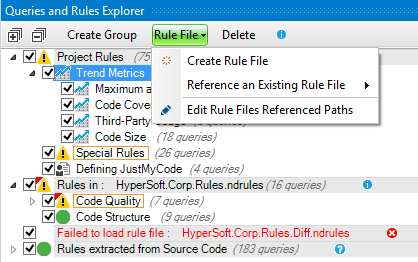
Rule Files can be created and shared among NDepend projects. This is useful to define company-level standard rules sets shared amongst projects, and get them applied by all teams.
As the source code is the design you might prefer storing your CQLinq queries and rules directly in your source code (C#, VB.NET...) as explained in the document Declare CQLinq rules in C# or VB.NET source code.
Why does NDepend use the web?
NDepend Trial and Professional Edition both use the web to inform you if a newer version is available.
One other thing the professional edition does is to contact us programmatically for anti-piracy reasons. Don't worry though: it only sends us license information, the NDepend version number and unique IDs of the machine; at no time will any of your personal or professional information be sent.
What's more, you don't even need to be connected to the internet to use our tool because the professional edition will still function without it, once registered.