
Reporting Code Diff
|
This document explains how to use the NDepend diff since baseline features in the context of reporting. The document Code Diff since Baseline explains how to use the NDepend build comparison features, in the context of Visual Studio and VisualNDepend.exe. |
NDepend can report Code Diff since baseline in the report. To report Code Diff, there are two steps.
- First, define the baseline for comparison
- Second, define the CQLinq queries and rules related to Code Diff
The baseline for comparison is per default set to the first analysis result available for the current NDepend project. Per default analysis results are stored at most every day and after 30 days the analysis result closest to 30 days ago is chosen.
To change this default setting, go into the NDepend Project Properties panel in the interactive UI. In the Analysis tab of this panel, there is an option named Baseline for Comparison. The Baseline for Comparison represents the previous code base snapshot. The current code base snapshot will be compared to this previous code base snapshot.
Two different Baselines for Comparison can be defined: one to be used in Visual Studio and VisualNDepend.exe, one to be used at analysis and reporting time. It is recommended to define the same Baseline for Comparison for both interactive UI and reporting scenarios.
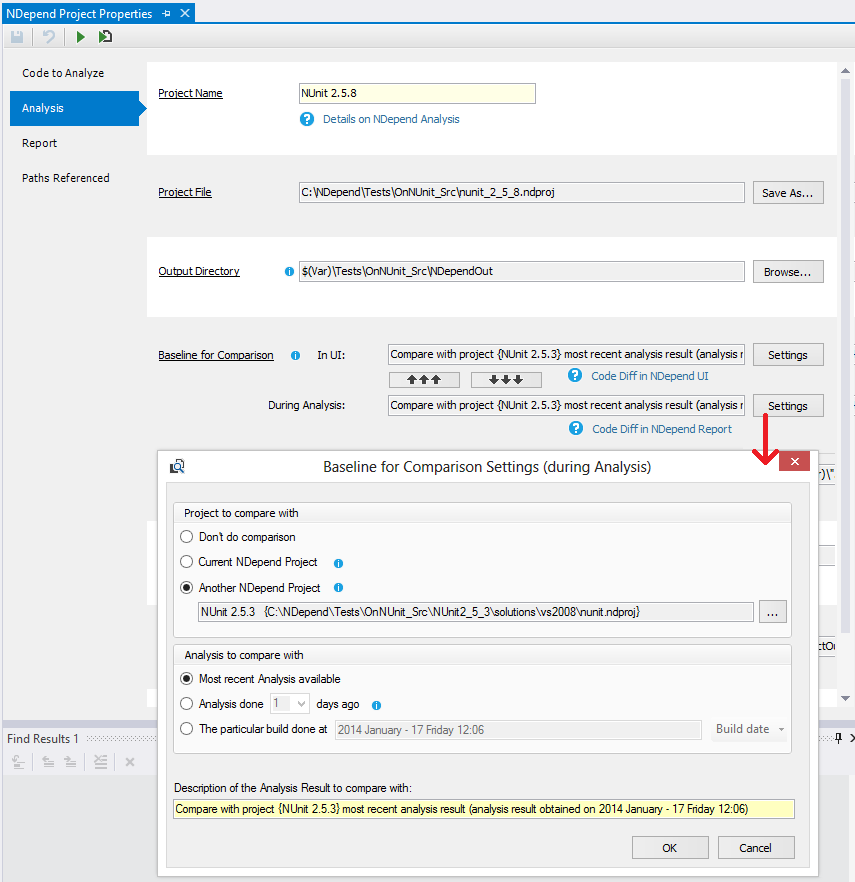
After having defined the Baseline for Comparison, have a look at the standard CQLinq groups named:
Here, many CQLinq queries and rules related to code diff are already defined. You can use them straight, or customize them to your needs.
