
NDepend.Console.exe command line options
NDepend can analyze .NET code and produce report through $NDependInstallDir$\NDepend.Console.exe and $NDependInstallDir$\net10.0\NDepend.Console.MultiOS.dll. Let's first compare these two executables.
|
$NDependInstallDir$\NDepend.Console.exe requires .NET 4.7.2 or upper to run on Windows. $NDependInstallDir$\net10.0\NDepend.Console.MultiOS.dll requires .NET 10.0 or .NET 9.0 or .NET 8.0 to run on Windows, Linux or macOS. All NDepend.Console.exe switches explained in the present documentation are also supported by NDepend.Console.MultiOS.dll. You can refer to Getting Started with NDepend on Linux and macOS if you want to use NDepend.Console.MultiOS.dll on Linux or macOS. |
Analyze and Build Report with NDepend.Console
| Notice that NDepend.Console.exe returns a non-zero exit code when at least one Quality Gate fails. This exit code can be used to eventually stop your build process in such situation. |
Mandatory
-
The path to the input .ndproj NDepend project file.
It must be specified as the first argument. If you need to specify a path that contains a space character use double quotes ".. ..". The specified path can be either an absolute path (with drive letter C:\ or UNC \\Server\Share format), a path relative to the current directory (obtained with System.Environment.CurrentDirectory), or a file name in the current directory.
Following arguments are OPTIONAL and can be provided in any order. Any file or directory path specified in optional arguments can be:
- Absolute : with drive letter C:\ or UNC \\Server\Share format.
- Relative : to the ", productName, @" project file location.
- Prefixed with an environment variable with the syntax %ENVVAR%\Dir\
- Prefixed with a path variable with the syntax $(Variable)\Dir
Optional
- /ViewReport: to view the HTML report
- /Silent: to disable output and eventual calls to Console.Read() on console
- /HideConsole: to hide the console window
- /Concurrent: to parralelize analysis execution
- /LogTrendMetrics: to force log trend metrics
- /TrendStoreDir: to override the trend store directory specified in the NDepend project file
- /PersistHistoricAnalysisResult: to force persist historic analysis result
- /DontPersistHistoricAnalysisResult: to force not persist historic analysis result
- /ForceReturnZeroExitCode: to force return a zero exit code even when one or many quality gate(s) fail
- /HistoricAnalysisResultsDir: to override the historic analysis results directory specified in the NDepend project file.
-
/OutDir dir : to override the output directory specified in the NDepend project file.
VisualNDepend.exe won't work on the machine where you used NDepend.Console.exe with the option /OutDir because VisualNDepend.exe is not aware of the output dir specified and will try to use the output dir specified in your NDepend project file.
- /AnalysisResultId id: to assign an identifier to the analysis result
-
/GitHubPAT pat: to provide a GitHub PAT (Personal Access Token).
Such PAT is used in case some artifacts (like a baseline analysis result) are required during analysis and must be loaded from GitHub. Such PAT overrides the PAT registered on the machine (if any).
- /XslForReport xlsFilePath: to provide your own Xsl file used to build report
- /KeepXmlFilesUsedToBuildReport: to keep xml files used to build report
-
/InDirs dir1 [dir2 ...]: to override input directories specified in the NDepend project file.
This option is used to customize the location(s) where assemblies to analyze (application assemblies and third-party assemblies) can be found.
Only assemblies resolved in dirs are concerned, not assemblies resolved from a Visual Studio solution.
The search in dirs is not recursive, it doesn't look into child dirs.
Directly after the option /InDirs, the option /KeepProjectInDirs can be used to avoid ignoring directories specified in the NDepend project file.
-
/CoverageFiles file1 [file2 ...]: to override input coverage files specified in the NDepend project file.
Directly after the option /CoverageFiles, the option /KeepProjectCoverageFiles can be used to avoid ignoring coverage files specified in the NDepend project file.
- /CoverageDir dir: to override the directory that contains coverage files specified in the project file
- /CoverageExclusionFile file: to override the .runsettings file specified in the project file. NDepend gathers coverage exclusion data from such file.
-
/RuleFiles file1 [file2 ...]: to override input rule files specified in the NDepend project file.
Directly after the option /RuleFiles, the option /KeepProjectRuleFiles can be used to avoid ignoring rule files specified in the NDepend project file.
- /PathVariables Name1 Value1 [Name2 Value2 ...]: to override the values of one or several NDepend project path variables, or create new path variables.
-
/AnalysisResultToCompareWith: to provide a previous analysis result to compare with.
Analysis results are stored in files with file name prefix NDependAnalysisResult_ and with extension .ndar. These files can be found under the NDepend project output directory. The preferred option to provide a previous analysis result to compare with during an analysis is to use: NDepend > Project Properties > Analysis > Baseline for Comparison You can use the option /AnalysisResultToCompareWith in special scenarios where using Project Properties doesn't work.
- /Help: to display the current help on console
-
If you need to adjust the code queries execution time-out used during analysis through NDepend.Console.exe just run VisualNDepend.exe once on the machine running NDepend.Console.exe and choose a time-out value in VisualNDepend > Tools > Options > Code Query > Query Execution Time-Out.
This parameter is persisted in the file VisualNDependOptions.xml that can be found in the directory VisualNDepend > Tools > Options > Export / Import / Reset Options > Open the folder containing the Options File
Adjusting the code queries execution time-out
Create a Project File with NDepend.Console
NDepend.Console.exe can be used to create an NDepend project file. This is useful to create NDepend project(s) on-the-fly from a script.
Other ways to create an NDepend project is either by using VisualNDepend.exe or by creating a .NET program that rely on NDepend.API as explained here
Here are arguments required to created a project with NDepend.Console.exe:
- To do so the first argument must be /CreateProject or /cp (case-insensitive).
- The second argument must be the project file path to create. The file name must have the extension .ndproj. If you need to specify a path that contains a space character use double quotes "...". The specified path can be either an absolute path (with drive letter C:\ or UNC \\Server\Share format), a path relative to the current directory (obtained with System.Environment.CurrentDirectory), or a file name in the current directory.
Then at least one or several sources of code to analyze must be precised. A source of code to analyze can be:
A path to a Visual Studio solution file.
The solution file extension must be .sln.
The vertical line character '|' can follow the path to declare a filter on project names (as explained in this section). If no filter is precised the default filter -test is defined. If you need to specify a path or a filter that contains a space character use double quotes "...".
Example: "..\My File\MySolution.sln|filterIn -filterOut".A path to a Visual Studio project file. The project file extension must be within: .csproj .vbproj .proj
A path to a compiled assembly file. The compiled assembly file extension must be within: .dll .exe .winmd
Notice that source of code paths can be absolute or relative to the project file location.
If you need to specify a path or a filter that contains a space character use double quotes "...".
Here is a short example that illustrates arguments to create a project:
>NDepend.Console.exe /cp C:\temp\MyProj.ndproj "..\src\MySolution.sln|-filter"
"E:\My Dir\MyAssembly1.dll" E:\MyDir\MyAssembly2.dll
|
Windows absolute paths are formatted like "C:\Dir" and "\\Server\Share" while Linux or macOS absolute paths are formatted like "/mnt/c/dir/". Thus absolute paths are compatible between Linux and macOS, but incompatible with Windows (and vice-versa). As a consequence if an NDepend project or analysis result is aimed to be used on various OS there are a few caveats:
|
Register a License or Start Evaluation with NDepend.Console
NDepend.Console.exe can be used to register a license on a machine, or to start evaluation. Here are console arguments to use (case insensitive):
- /RegEval : Start the NDepend 14 days evaluation on the current machine.
- /RegLic XYZ : Register a seat of the license key XYZ on the current machine. Notice that the license XYZ must be a Build Machine license to run NDepend.Console.exe.
- /UnregLic : Unregister a seat of the license key already registered on the current machine.
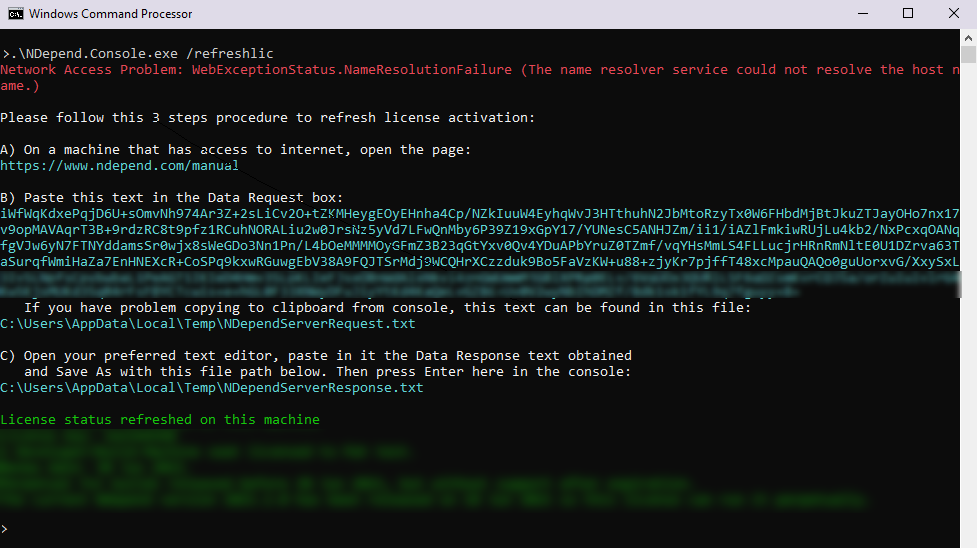
- /RefreshLic : Refresh the license data already registered on the current machine. This is useful when the license changes upon renewal.
Each of these operation requires internet access to do a roundtrip with the NDepend server. If the current machine doesn't have internet access, a procedure is proposed to complete the operation by accessing manually the NDepend server from a connected machine.
Register a GitHub PAT with NDepend.Console
A GitHub PAT (Personal Access Token) can be registered on a machine. This way when NDepend needs to access GitHub, it can use such PAT. Here are console arguments to use (case insensitive):
- /RegGitHubPAT XYZ : Register the GitHub PAT XYZ on the current machine.
- /UnregGitHubPAT : Unregister the GitHub PAT actually registered on the current machine.
As explained above, when using NDepend.Console.exe to run an analysis, a PAT can be provided with the switch GitHubPAT. In such case, during analysis the PAT provided overrides the PAT registered on the machine (if any).