
NDepend.MCP.Server
The NDepend.MCP.Server is an open-source Model Context Protocol server that gives your coding agent what NDepend knows about your .NET code: the issues, the rules, the quality gates, the dependencies, the metrics and the source files, with the baseline to compare against. You steer the session, your agent asks NDepend instead of exploring the code base on its own.
NDepend.AI or the MCP Server?
Both put NDepend's analysis in front of your coding agent. They differ in who drives.
- NDepend.AI drives: you pick the issues to fix with a code query, and its harness runs the fix rounds unattended, with parallel agent sessions, then builds your solution, runs your tests, re-analyzes the code and produces a report that says which issues are really fixed. This is the way to fix hundreds of issues at scale. NDepend.AI registers this same MCP server with the agent it drives.
- The MCP Server alone: you drive your own agent session, in your IDE or in your terminal, and the agent queries NDepend when it needs to: which issues a method has, what a rule expects, who calls what, which quality gate fails. Nothing runs unattended, nothing is verified for you. This is the way to work on a few issues, to explore a code base, or to write code queries and rules in natural language.
Either way the agent gets each issue with its exact location and the rule's fix guidance, rather than searching for problems by itself: fewer tokens, and fixes aimed at what NDepend actually reports.
What Your Agent Gets: the 14 MCP Tools
The server exposes 14 tools. The first one must be called first: it initializes the session from a .NET solution, using the NDepend project attached to it or creating one next to it.
| Tool | What it does |
|---|---|
ndepend-initialize-from-solution | Initializes the NDepend session from a .NET solution. Required first step. |
ndepend-run-analysis | Runs the NDepend analysis and refreshes the session data. |
ndepend-run-analysis-build-report | Runs the analysis, builds the web report and opens it in the browser. |
ndepend-list-issues | Lists the issues, scoped by the request: a rule, a file, a type, the new issues since the baseline... |
ndepend-get-issue-details-to-fix-it | Returns the diagnostic details of one issue, with the guidance to fix it. |
ndepend-list-all-rules-summary | Returns the rules by category, with their issue counts. |
ndepend-list-rules-detailed | Returns the rules with their descriptions and fix guidance, paginated. |
ndepend-list-quality-gates-status | Returns the status of each quality gate. |
ndepend-search-code-metrics | Collects and analyzes code metrics; also the code search entry point. |
ndepend-list-dependencies | Lists the callers and callees of code elements and generates an SVG dependency diagram. |
ndepend-get-sources | Returns source code as raw text. |
ndepend-diff-sources | Compares the current content of a source file with its baseline version. |
ndepend-gen-code-query-and-rule | Makes the agent an expert in CQLinq code query and rule generation. |
ndepend-run-code-query-or-rule | Compiles and runs a code query or rule against the analysis result and the baseline; can check compilation only. |
Install and Register the Server
The server is a .NET 10 program built on the NDepend.API, released under the MIT license. It runs on Windows, Linux and macOS and needs an NDepend redistributable, version 2026.1.3 or above, with an evaluation or a license (the NDepend.API is not covered by the MIT license). The README on GitHub is the reference; in short:
- Clone the repository.
- Download the NDepend zipped redistributable and unzip it into
artifacts\ndependunder the repository. - Run
VisualNDepend.exeonce from there, to start the evaluation or register your license. - Build
NDepend.Mcp.Server.sln. It producesNDepend.Mcp.StdioServer.exeandNDepend.Mcp.HttpServer.exeunderartifacts\bin. - Register the server with your agent: the stdio executable as a command, or the HTTP server at
http://localhost:3001/mcponce it runs.
Any MCP client can use it: Claude Code, OpenAI Codex, GitHub Copilot CLI, JetBrains Junie, Kiro, Mistral Vibe, Muse Code, OpenCode, Visual Studio 2026, VS Code with GitHub Copilot...
For Visual Studio and VS Code, the README lists the mcp.json locations, global or per solution, and warns against listing the server in both at once.
NDepend.AI registers the server itself with the agent it drives: nothing to configure.
AI Issue Fix in Action
The screen recording below shows an issue list and a fix applied by the agent, through the MCP server, directly from the VS Code Copilot chat:
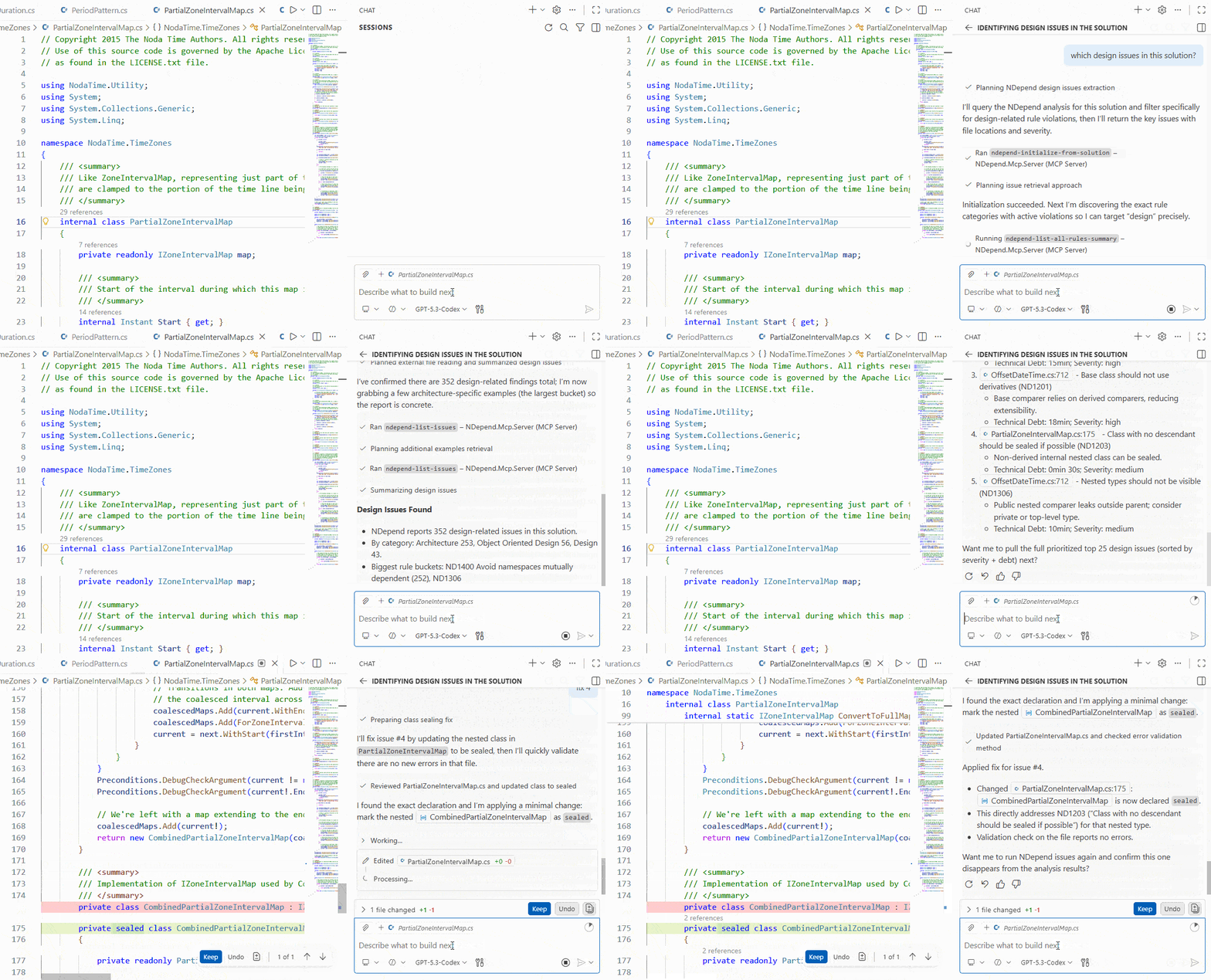
Watch the video to get started with the NDepend.MCP.Server, and to learn what we learned while building an MCP server in C#.
Jump to 10:17 to watch an issue fixed live.