
NDepend.AI
Why NDepend.AI?
A coding agent like Claude Code, OpenAI Codex, GitHub Copilot CLI or JetBrains Junie can find real issues in your code and fix them. NDepend.AI steers your agent with NDepend:
- The agent stays on track: the run goes in fix rounds. Each round targets a batch of issues, then the solution is built, the impacted tests run and the code is analyzed again.
- Fewer tokens: NDepend already knows your code. The agent gets each issue with its location and queries the code model through the integrated NDepend.MCP.Server, instead of exploring the code base.
- Every issue is accounted for: each issue targeted ends up fixed, suppressed or left, and the issues introduced by the fixes are caught. An issue counts as fixed only when the new analysis doesn't report it anymore.
- Predictable: every run follows the same steps, whether you start it from VisualNDepend, Visual Studio or your CI/CD pipeline. Two runs on the same code, with the same agent and settings, give results less than 1% apart.
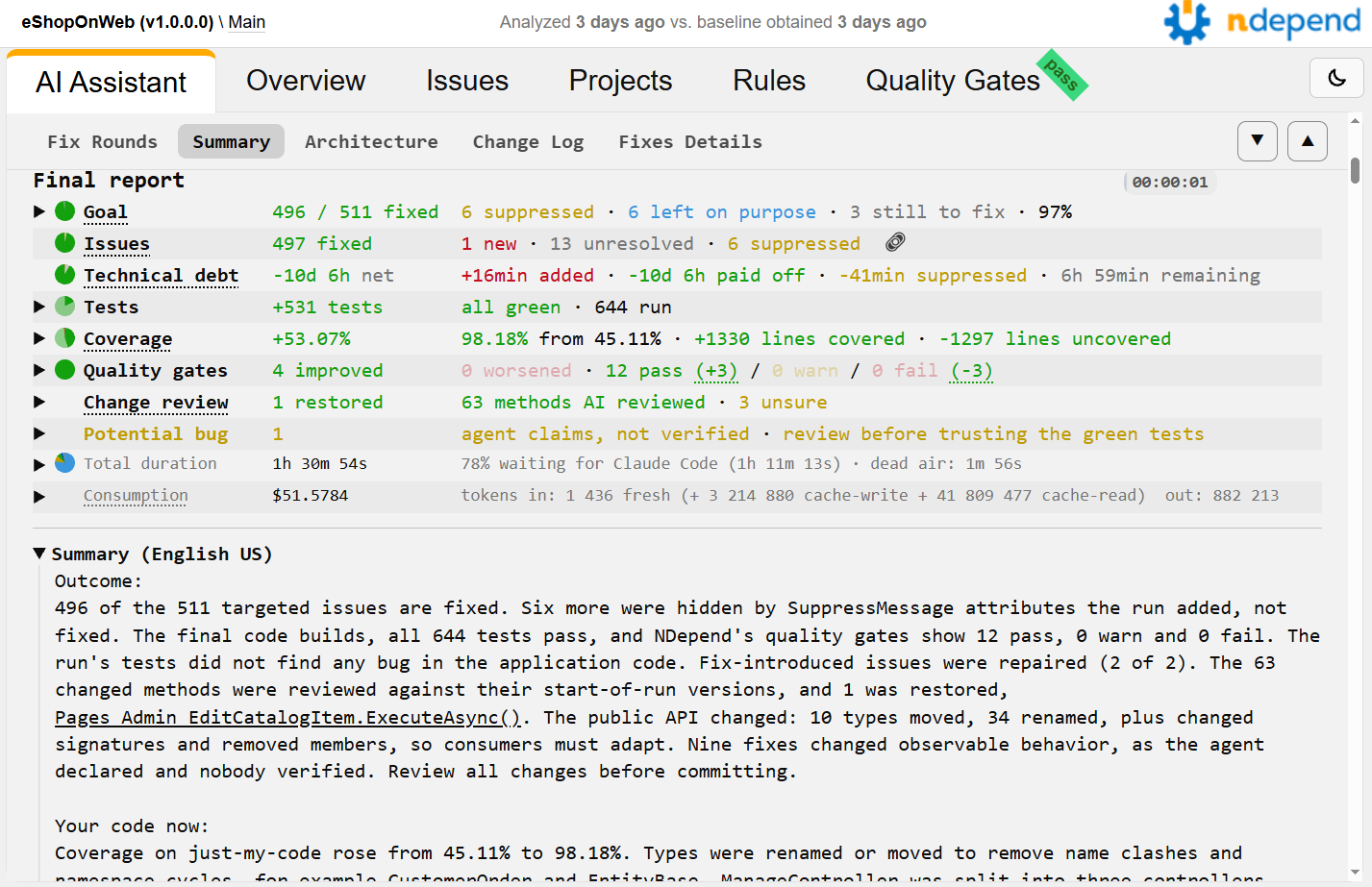
- A report to review the work done: the issues fixed, the code diff, the tests and the coverage, the quality gates, the potential bugs found, the duration and the cost.
The report of a run on eShopOnWeb: 496 of the 511 issues targeted fixed, 531 tests added, coverage from 45% to 98% (see this report live).
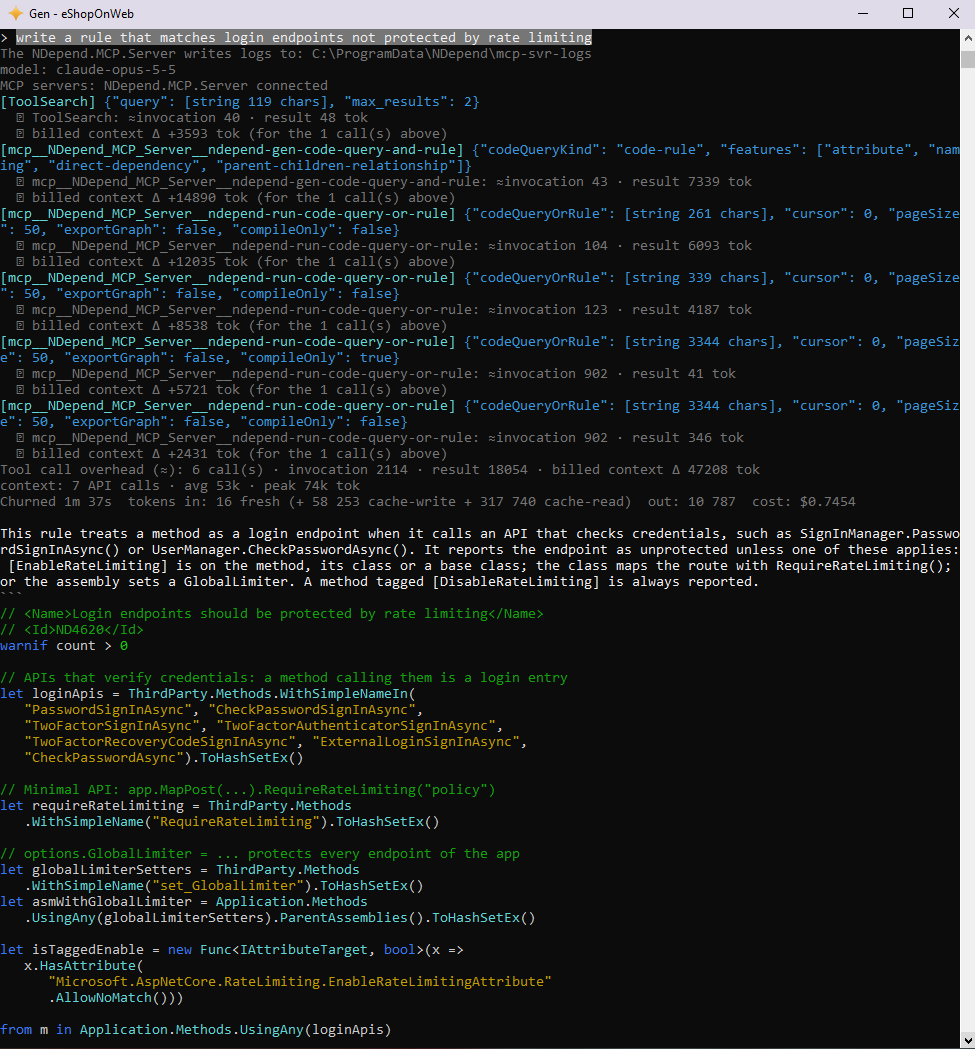
NDepend.AI also writes, refines and fixes CQLinq code queries and rules from a request in natural language, see NDepend.AI Commands.
How a Fix Issues Run Works
- Analysis: NDepend.AI analyzes the code and pins the baseline. This way the code diff and the issues shown at the end are about the changes made during the run only. When a .sln or .slnx solution has no NDepend project yet, one is created and analyzed.
- Tests before any fix: all the tests run once, to know which tests already fail.
- Fix rounds: the agent fixes a batch of issues, then NDepend.AI builds the solution, runs the impacted tests and analyzes the code again.
- Sweep: a fix can introduce an issue, like an uncovered method or a type with too many fields. The sweep repairs these issues without undoing the fixes.
- Tests & Coverage: when the NDepend project analyzes the test assemblies and imports the code coverage, the agent writes tests for the uncovered code. Every test written must assert something. These are fast unit tests: the agent refuses to write expensive integration tests unless you explicitly ask for them. When some lines cannot be covered because of a bug, the agent reports a potential bug instead of writing a test that would lock in the wrong behavior.
- Change review: every method whose body changed is reviewed against its start-of-run version to catch unintended behavior changes. The bugs found are fixed, then the code is built and analyzed again, and the tests run again.
- Report: all the tests run one last time, and the report is written: an AI Assistant tab in the NDepend web report, and an HTML or text log.
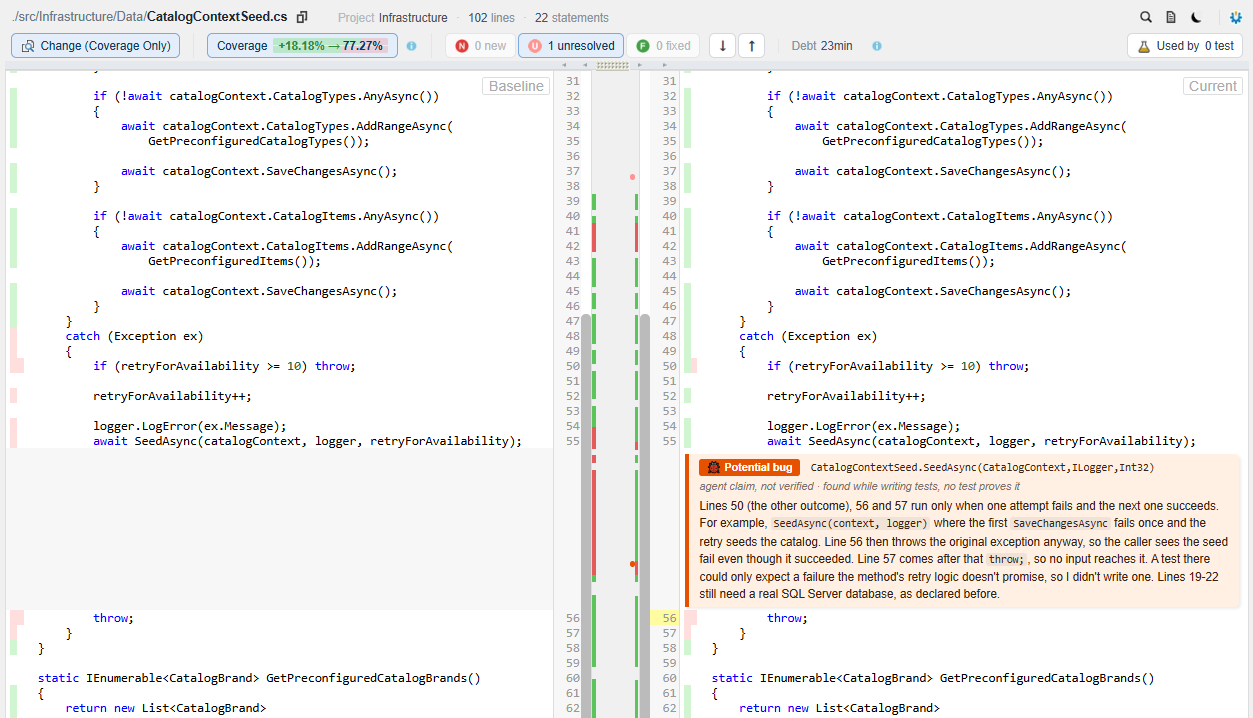
A potential bug is the agent's claim, not proven by a test: the report asks you to review it before trusting the green tests.
Start NDepend.AI from VisualNDepend, Visual Studio or the Console
From VisualNDepend or from the NDepend Visual Studio extension:
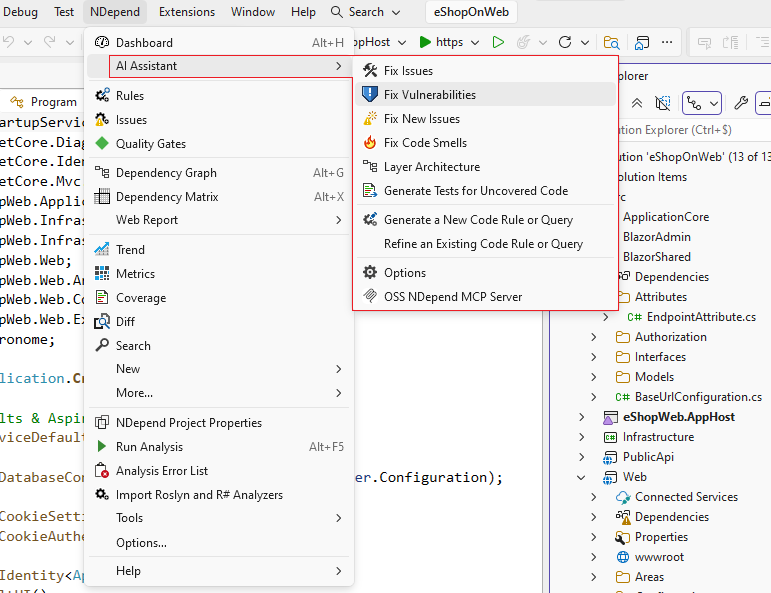
- The AI Assistant menu offers one-click commands: Fix Vulnerabilities, Fix New Issues (since the baseline) and Fix Code Smells.
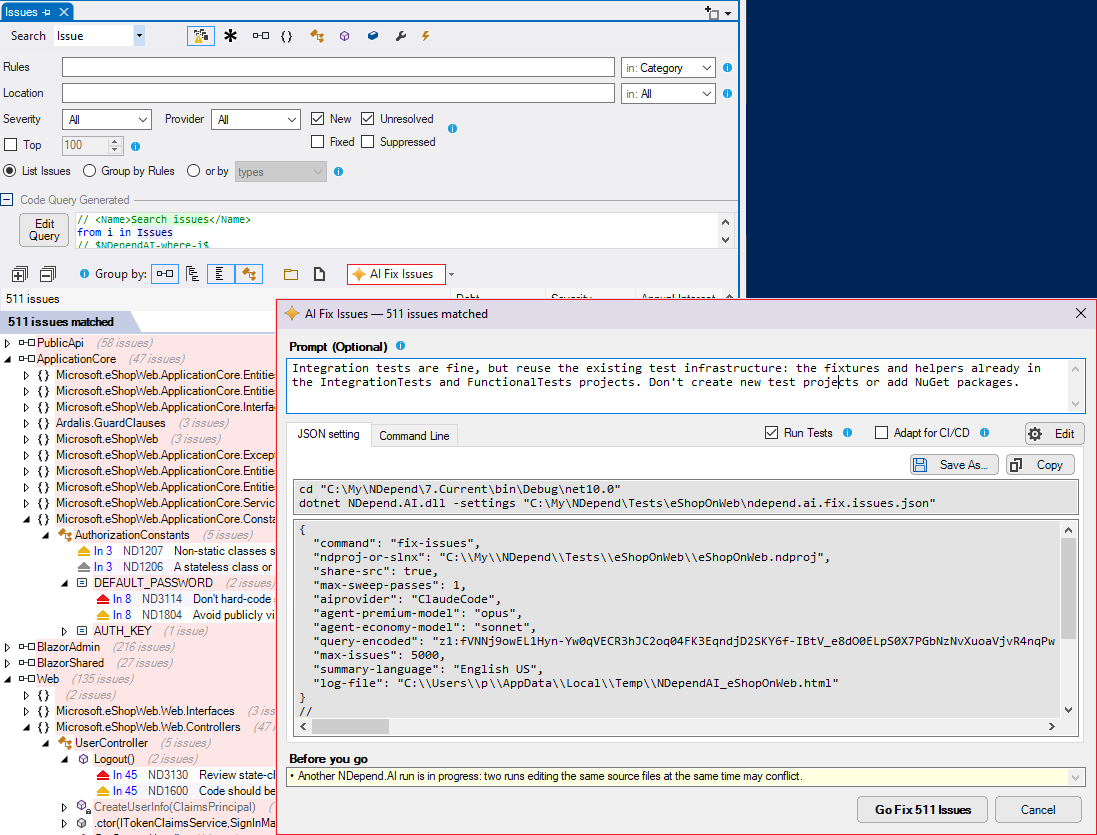
- An AI Fix Issues button shows up whenever a code query or a rule matches issues.
- The AI provider and its models, the log and the language of the AI summary are set in Options > AI Assistant. These options are shared by VisualNDepend, the Visual Studio extension and NDepend.AI.
The AI Fix Issues dialog lets you add an optional prompt to steer the agent, then click Go Fix N Issues. Its Command Line and JSON tabs give the very same run as a command line and as a settings file, ready for your CI/CD pipeline.
From the console:
- On Windows, run $NDependInstallDir$\NDepend.AI.exe.
- On Windows, Linux (WSL included) and macOS, run dotnet $NDependInstallDir$/net10.0/NDepend.AI.dll. See Getting Started on Linux and macOS.
- NDepend.AI requires the .NET 10.0 runtime.
- All arguments are optional. Started with no argument, NDepend.AI guides you step by step: the command, the project, the AI provider and the issues to fix.
NDepend.AI Commands
The argument -command selects the task to run:
- fix-issues: let a coding agent edit the source code to fix the issues reported by NDepend, Roslyn Analyzers or ReSharper.
- gen-query: generate a CQLinq query, code rule or quality gate from a request in natural language.
- refine-query: refine an existing CQLinq query: profile it, speed it up or improve it.
- fix-query-errors: fix the compile errors of a CQLinq query.
- change-ai-provider: switch the AI provider (and, for a direct LLM, its key and model).
The generated query opens in the NDepend query editor, and Run it! runs it right in the console. In VisualNDepend and in Visual Studio, the query editor shows a Generate, Refine or Fix Errors button, depending on the query state.
AI Providers
- Coding agents: ClaudeCode, Codex, CopilotCLI and Junie. They run all the commands, including fix-issues. The coding agent must be installed on the machine. Two models are used: a Premium model for the judgment work, and an Economy model for the mechanical edits.
- Direct LLM: OpenAILlm and AnthropicLlm, with your own API key. They generate, refine and fix code queries, but they cannot edit code, hence they cannot run fix-issues.
NDepend.AI Command Line Arguments
|
All arguments are optional: an argument omitted is asked for interactively.
Run NDepend.AI.exe -help to display the help on console. |
Command and project
- -command <kind>: the task to run, one of fix-issues, gen-query, refine-query, fix-query-errors or change-ai-provider, see NDepend.AI Commands.
- -ndproj-or-slnx <path>: absolute path to an NDepend project (.ndproj) or a .NET solution (.slnx / .sln) to analyze.
- -query-name "<query name>": name of the query in the NDepend project to operate on. For fix-issues, the query listing the issues to fix.
- -query-encoded z1:<token>: the query to operate on itself, compressed: its UTF-8 text, raw-Deflate'd then base64url-encoded. This is what VisualNDepend, Visual Studio and their CI command lines pass: one token that needs no quoting in any shell.
AI provider
- -aiprovider <name>: the AI backend, one of ClaudeCode, Codex, CopilotCLI, Junie, OpenAILlm or AnthropicLlm.
- -llm-model "<id>": for a direct LLM provider, the model id to use.
- -llm-key "<key>": for a direct LLM provider, your own API key. It is mandatory for these providers. Never hardcode it.
-
-agent-premium-model "<alias>": for a coding agent, the model of the Premium tier, used for the judgment work.
When omitted, the model chosen last time is used, else the agent's default model. "" explicitly means the default model of the agent CLI.
-
-agent-economy-model "<alias>": for a coding agent, the model of the Economy tier, used for the mechanical, low-judgment edits. Same rules as -agent-premium-model.
Claude Code, Codex and Junie also accept an effort suffix, like "opus@medium".
-
-agent-profile "<name>": for a coding agent, run the coding turns under one of your named agent profiles: a Claude Code agent or a GitHub Copilot CLI custom agent (passed as --agent), or a Codex profile (passed as --profile). It is not supported for Junie.
The profile then decides the model and the tools: the Premium and Economy models are not applied to those turns. When omitted, the profile chosen last time is used (the command change-ai-provider lists the profiles it finds). "" explicitly means no profile.
- -share-src: allow sharing your source code with the model, so it can read and edit your files. Required for fix-issues.
-
-no-ndepend-mcp: run the coding agent without the NDepend MCP server.
By default the NDepend.MCP.Server shipped next to NDepend.AI is exposed to the agent. It lets the agent query the NDepend code model, fetch the issue details and validate CQLinq queries. Without it, the query commands and the self-verifying phases degrade.
-
-mcp-config "<file path>": absolute path to a JSON file that declares additional MCP servers the coding agent can call, next to the NDepend MCP server. The file has the usual .mcp.json / mcp-config.json format, and ${VAR} is expanded from the environment:
{
  "mcpServers": {
    "my-local-server": { "command": "...", "args": [ "..." ], "env": { "...": "..." } },
    "my-http-server":  { "type": "http", "url": "...", "headers": { "...": "..." } }
  }
}
These servers are session-scoped for every agent: nothing is written to the agent's own configuration. An entry named NDepend.MCP.Server replaces the shipped server by your own build of it (command is its .exe or .dll path, with optional args and env). NDepend.AI still passes it the project to load.
When omitted, the file set in Options > AI Assistant > Additional MCP servers is used, if any.
Fix issues (-command fix-issues)
- -max-issues <number>: the maximum number of issues to fix in one run. The default is 300 with a license. During evaluation it is 30, and a higher value is clamped.
-
-max-sweep-passes <number>: after the fix rounds, the sweep repairs the issues introduced by the fixes of the run (a fix can create an uncovered method, a type with too many fields…) without undoing those fixes. Each pass targets what the previous one left or introduced.
This is the maximum number of passes: the sweep stops earlier when nothing is left or when a pass makes no progress. The default is 1, at most 5. With 0 there is no sweep: the issues introduced are accepted and reported.
-
-build-cmd "<command>": the command line that builds the solution(s), test projects included, to verify the fixes.
The default is dotnet build on the solution, or Visual Studio MSBuild when the solution holds projects that the .NET SDK can't build: legacy-style, VSIX, C++…
-
-run-all-tests-cmd "<command>": the command line that runs all the tests, before any fix (to know which tests already fail) and at the end.
The default is dotnet test --no-build on the solution, in the VSTest or the Microsoft.Testing.Platform syntax selected by the SDK and global.json, plus Visual Studio's vstest.console.exe on the legacy .NET Framework test projects that dotnet test skips.
The result is judged by the exit code, and by the TRX result files when the command logs them. This command must write the coverage files where the NDepend project reads them. The tests impacted by each fix round always run through NDepend's own per-project commands.
- -no-tests: never run the tests. The fixes are verified by the build and the analysis only, and the coverage issues cannot be fixed.
-
-slow-tests-minutes <minutes>: when the full test run before any fix takes longer than this many minutes, the run is in slow test suite mode: the full test suite runs once more only, at the end. The tests impacted by each fix round and the tests just written still run as usual, and the coverage of the Tests & Coverage phase is measured by that last run.
The default is 15, at most 1440. With 0 the slow test suite mode is always on, with never it is never on.
-
-no-coverage-phase: never write tests. The Tests & Coverage phase is skipped: the coverage issues targeted, and the ones introduced by the fixes (new code left uncovered), are reported but not fixed.
By default this phase runs when the NDepend project analyzes the test assemblies and imports the code coverage.
-
-no-changes-review: skip the closing Change Review round.
By default every method whose body was changed by the run is reviewed against its start-of-run version, to catch unintended behavior changes. This review is about correctness only, since the NDepend rules already verify the quality. The bugs found are fixed, then the code is built and analyzed again, and the tests run again. The Change Log of the report marks each change reviewed.
- -wait-for-agent <minutes>: when the AI provider fails (overloaded or network error), wait up to this many minutes for it to recover, then retry the failed agent call once. The default is 30. With 0 NDepend.AI never waits, and the call just fails.
- -summary-language "<language>": the language of the AI-written Summary of the report, like "Français" or "Japanese". The default is English. Only the Summary changes: the log and the rest of the report stay in English (40 characters max).
Console and log
- -theme dark|light: the console theme. The default is dark.
- -log-file "<file path>": log all the console output to this .txt or .html file. The .html log is colored.
- -open-log-file: open the log file when the session ends (requires -log-file). Skipped when the fix-issues report already opened on its AI Assistant tab, which holds the same log.
- -no-pause: exit silently when the session ends: no close prompt, and the fix-issues report is not opened in the browser. This is for CI/CD and unattended runs. It requires an NDepend Build Machine license, and it is also available during evaluation so you can test it.
- -label "<text>": free text that identifies this run in the log and in the AI Assistant tab, like a CI build number, a PR or ticket id, or a branch. Shown as given (one line, 100 characters max).
Settings file and help
- -settings "<file path>": a JSON file holding any of the arguments above, see Settings File.
- -h, -help, /h or /help: show the help on console.
Settings File
Any argument can be stored in a JSON file passed with -settings, keyed by its name. The value of a flag is true or false:
{
  "command": "fix-issues",
  "ndproj-or-slnx": "C:\\Dev\\MyApp\\MyApp.ndproj",
  "query-name": "New issues since baseline",
  "aiprovider": "ClaudeCode",
  "agent-premium-model": "opus@high",
  "agent-economy-model": "sonnet",
  "share-src": true,
  "max-issues": 100,
  "log-file": "C:\\Dev\\MyApp\\out\\NDependAI.html"
}
- An argument typed on the command line wins over the entry of the file.
- Relative paths in the file are resolved from the directory of the file.
- An unknown key, a duplicate key or a value of the wrong type is an error: a typo never falls back silently to a default value.
- Without -settings, a file named ndepend.ai.<command>.json next to the -ndproj-or-slnx file is picked up automatically for that command, like ndepend.ai.fix.issues.json for fix-issues. A run started from VisualNDepend or Visual Studio doesn't pick it up: it runs exactly its command line.
- The JSON tab of the AI Fix Issues dialog, and the Console Arguments section of the fix-issues log, show the settings file to save.
Examples
>NDepend.AI.exe

>NDepend.AI.exe -help

>NDepend.AI.exe -command fix-issues -ndproj-or-slnx C:\Dev\MyApp\MyApp.ndproj -query-name "New issues since baseline" -aiprovider ClaudeCode -share-src

>NDepend.AI.exe -command fix-issues -ndproj-or-slnx C:\Dev\MyApp\MyApp.slnx -aiprovider Codex -share-src -max-issues 50 -no-coverage-phase

>NDepend.AI.exe -command gen-query -ndproj-or-slnx C:\Dev\MyApp\MyApp.ndproj -aiprovider CopilotCLI

>NDepend.AI.exe -settings C:\Dev\MyApp\ndepend.ai.fix.issues.json -no-pause -label "Build 1234"

>dotnet $NDependInstallDir$/net10.0/NDepend.AI.dll -command fix-issues -ndproj-or-slnx /home/me/dev/MyApp/MyApp.slnx -query-name "New issues since baseline" -aiprovider ClaudeCode -share-src -no-pause
Run NDepend.AI in CI/CD
- -no-pause runs with no user interaction. It requires a Build Machine license, and is also available during evaluation.
- Provide all the arguments, on the command line or in a settings file: an argument omitted is asked for interactively.
- The command line ready for CI/CD is shown in the AI Fix Issues dialog and in each report, with a copy button. It holds the models and the agent profile actually used, since a CI machine doesn't have the options saved on your machine.
- The coding agent must be installed on the CI machine, and the agent profile used, if any, must be available there too.
- Keep the API key of a direct LLM provider in a secret of your pipeline, never in a file checked in.
- -log-file keeps a log of the run, and -label identifies it.
- By default a run fixes up to 300 issues (see -max-issues), the most severe first. Run it again to continue with the rest.
To only check the quality gates and the issues from a script or an AI coding agent, without NDepend.AI, see the switches /QualityGateCheck and /IssueCheck of NDepend.Console.exe.